



Key numbers
- 6 mph = 10:00 per mile (6:13 per km); 10 km/h = 6:00 per km (9:39 per mile)
- Smartphone GPS is typically accurate to within 4.9 m (16 ft) under open sky, worse near trees and buildings (GPS.gov)
- In a field test, 45% of GPS Doppler speeds were within 0.2 m/s of true speed, and a further 19% within 0.4 m/s (Witte & Wilson, 2004)
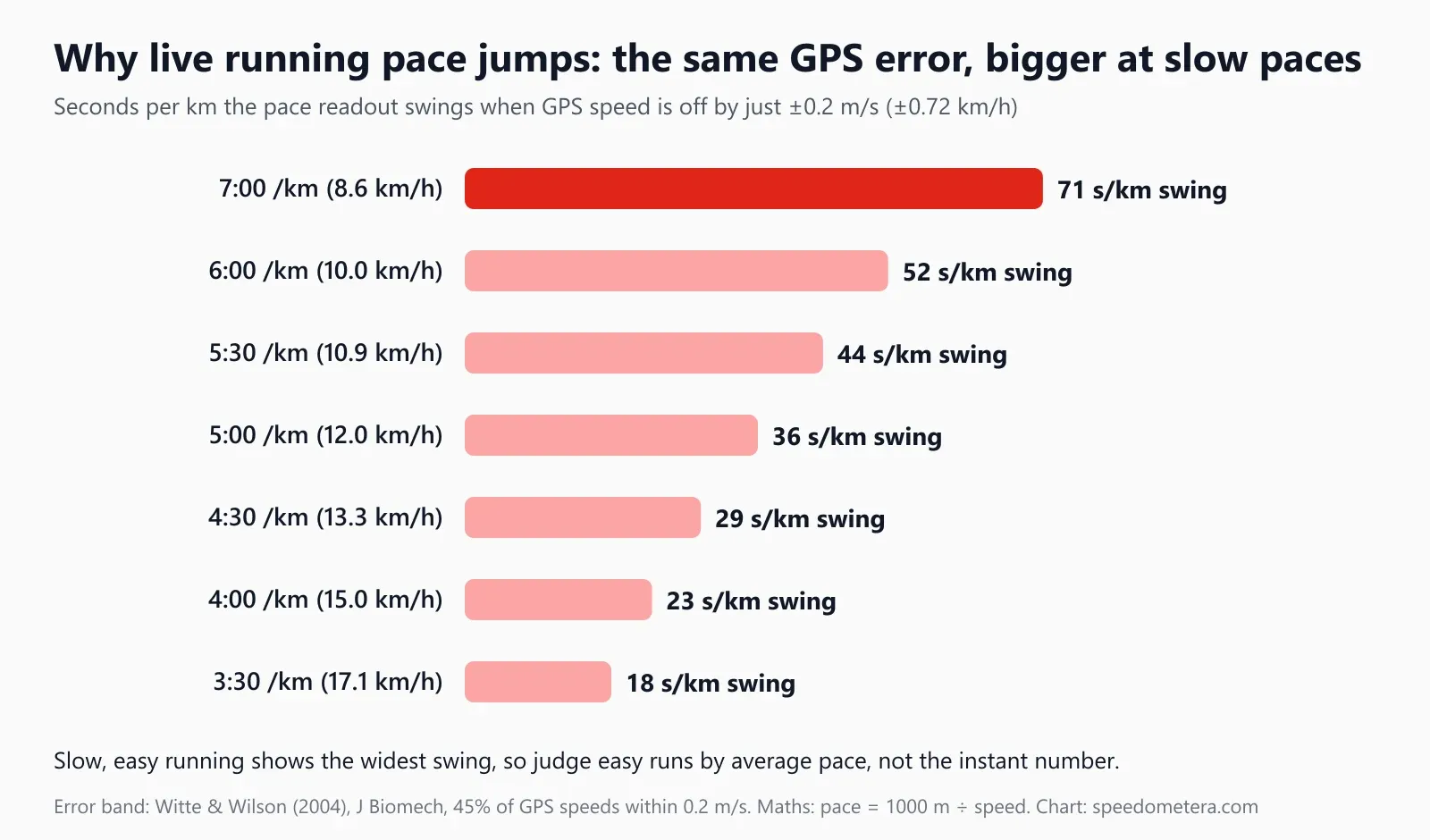
- A ±0.2 m/s speed error swings a 7:00/km pace by 71 seconds but a 4:00/km pace by only 23 seconds
- Eight GPS sport watches measured distance with 3.2–6.1% mean absolute error, worst in cities and forests (JMIR, 2020)
On this page
- How to use the Running Speedometer
- How to measure your running speed with your phone
- Running speed to pace: conversion tables
- How does a phone measure running speed?
- Why does instant running pace jump around?
- How accurate is GPS running speed under trees and tall buildings?
- Phone vs GPS watch vs footpod vs treadmill
- Using a running speedometer for intervals and sprints
- Battery, privacy and safety on the run
- Frequently asked questions
How to use the Running Speedometer
- 1Get a clear view of the skyHold the phone or keep it in an arm band; open the page before you start running.
- 2Tap Start and allow locationYour browser asks for location permission once. The first GPS fix usually arrives in 5–30 seconds.
- 3Pick your unitChoose km/h, mph, knots or m/s. Your choice is remembered on this device.
- 4Read speed, max, average and distanceThe gauge and digital readout update about once a second. Distance and average count only while you are moving.
- 5Stop or resetTap Stop to pause, Reset to clear the trip. Nothing is stored or sent anywhere.
Works in any modern phone browser. Back to the speedometer ↑
This running speedometer turns your phone into a live GPS speed and pace tracker: tap Start, run, and read your speed in mph or km/h with your current pace per mile or per km underneath. It also records top speed, moving average, distance and time, and exports the run as a GPX file. It runs in the browser, so there is nothing to install and no account.
Most “running speed tracker” pages stop at “download our app”. This one explains what the numbers mean while you run: why instant pace jumps around, how much to trust GPS under trees or between tall buildings, and how a phone compares with a GPS watch, a footpod and a treadmill display. Every conversion below is computed with exact constants (1 mile = 1,609.344 m), and every accuracy figure comes from GPS.gov, platform documentation or peer-reviewed studies. For pace maths and race predictions, use the pace calculator; for world records and how fast people run in general, see how fast can a human run.
Key terms on this page. Speed is distance per unit of time (mph, km/h). Pace is the inverse, time per unit of distance (minutes per mile or per km). Instant (or current) pace is computed from the latest GPS speed; average pace is total moving time divided by distance. Doppler speed is the velocity a GPS chip measures from the frequency shift of satellite signals. A footpod is a small accelerometer clipped to a shoe.
How to measure your running speed with your phone
Open this page, tap Start, allow location, wait for the GPS fix and start running; the gauge shows live speed, and the line underneath shows your pace. The running gauge reads up to 40 km/h (30 on the mph dial), so jogging and sprinting both sit in a readable part of the dial.
- Start outside, under open sky. Wait 5–30 seconds for the first fix. The “GPS accuracy” line under the gauge shows the current error radius; a value under about 10 m (33 ft) is good.
- Pick mph or km/h. The tool chooses mph in the US and km/h elsewhere and remembers your choice. Pace follows the unit: per mile with mph, per km with km/h.
- Carry the phone steadily. An armband, a running belt or a chest pocket gives a cleaner signal than a hand that swings across your body.
- Run. Speed updates about once a second. Distance and average count only while you are moving, so stopping at a crossing does not drag your average pace down.
- Use the extras. Set a speed alert for interval targets, switch to the digital view for a bigger number, and keep the screen on with the built-in wake lock.
- Stop and save. Note top speed, average and distance, or export a GPX file to load into a training log. Nothing is uploaded; the track stays on your phone.
Read the right number
For steady runs, glance at average pace, not the instant figure. For strides and sprints, look at top speed after the rep. The instant reading is most useful for checking that you have settled into a target pace after the first 20–30 seconds.
Running speed to pace: conversion tables
To turn speed into pace, divide 60 by the speed: 6 mph is 60 ÷ 6 = 10 minutes per mile, and 12 km/h is 60 ÷ 12 = 5 minutes per km. The tables below give exact values for the speeds most runners use, rounded to the nearest second.
pace (min per mile) = 60 ÷ speed (mph) · pace (min per km) = 60 ÷ speed (km/h) · 1 mph = 1.609344 km/h
| Speed (mph) | Speed (km/h) | Pace per mile | Pace per km | Typical effort |
|---|---|---|---|---|
| 4 | 6.4 | 15:00 | 9:19 | Run-walk, very easy jog |
| 5 | 8.0 | 12:00 | 7:27 | Easy jog |
| 5.5 | 8.9 | 10:55 | 6:47 | Easy jog |
| 6 | 9.7 | 10:00 | 6:13 | Steady recreational run |
| 6.5 | 10.5 | 9:14 | 5:44 | Steady run |
| 7 | 11.3 | 8:34 | 5:20 | Comfortably hard for many runners |
| 7.5 | 12.1 | 8:00 | 4:58 | 8-minute mile |
| 8 | 12.9 | 7:30 | 4:40 | Strong club runner, steady |
| 9 | 14.5 | 6:40 | 4:09 | Fast club runner |
| 10 | 16.1 | 6:00 | 3:44 | 6-minute mile |
| 12 | 19.3 | 5:00 | 3:06 | 5-minute mile |
Runners in India, Indonesia and most of Europe think in km/h and minutes per km, so here is the same table in metric steps:
| Speed (km/h) | Speed (mph) | Pace per km | Pace per mile |
|---|---|---|---|
| 6 | 3.7 | 10:00 | 16:06 |
| 7 | 4.3 | 8:34 | 13:48 |
| 8 | 5.0 | 7:30 | 12:04 |
| 9 | 5.6 | 6:40 | 10:44 |
| 10 | 6.2 | 6:00 | 9:39 |
| 11 | 6.8 | 5:27 | 8:47 |
| 12 | 7.5 | 5:00 | 8:03 |
| 13 | 8.1 | 4:37 | 7:26 |
| 14 | 8.7 | 4:17 | 6:54 |
| 15 | 9.3 | 4:00 | 6:26 |
| 16 | 9.9 | 3:45 | 6:02 |
| 18 | 11.2 | 3:20 | 5:22 |
| 20 | 12.4 | 3:00 | 4:50 |
The “typical effort” labels are rough guides, not standards: what feels easy depends on fitness, heat and hills. For finish-time predictions and splits for 5K, 10K, half and full marathon, use the pace calculator; for any distance and time, use the speed, distance and time calculator.
How does a phone measure running speed?
Phones measure speed mainly from the Doppler shift of GPS satellite signals, not by dividing the distance between two map points by time. Doppler speed is more precise than position, which is why your speed can be steady even when the dot on the map wobbles by several metres.
Each GPS satellite transmits on a known frequency. When you move toward or away from a satellite, the received frequency shifts slightly, and the chip turns those shifts from several satellites into a velocity. The browser exposes this through the W3C Geolocation API, whose speed attribute is “the magnitude of the horizontal component” of the device’s velocity in metres per second. Android’s Location API also reports a speed accuracy estimate at the 68th percentile confidence level, and Apple’s Core Location documentation describes speed as instantaneous and “for informational purposes only”, because the true speed can change many times between location updates.
Our speedometer uses that device speed when the phone provides it. If a phone reports no speed, it falls back to distance between fixes divided by time. It ignores any fix with an error radius over 50 m, treats anything under 0.5 m/s (1.1 mph) as standing still so GPS jitter does not add phantom distance, and smooths the displayed number slightly so it does not flicker every second.
GPS.gov puts the satellite side of speed error at 0.006 m/s or better over any 3-second interval (95% probability), but notes that what you see on a phone also depends on things the government does not control: satellite geometry, signal blockage, the atmosphere and receiver quality. In practice the receiver and your surroundings dominate.
Why does instant running pace jump around?
Pace is time divided by distance, so a small speed error becomes a large pace error when you run slowly. If the GPS speed is off by just 0.2 m/s (0.45 mph), a 7:00 per km pace can display anywhere between 6:27 and 7:39, while a 4:00 per km pace only moves between 3:49 and 4:12.
How big are real errors? In a field test published in the Journal of Biomechanics, Witte and Wilson (2004) compared a GPS receiver’s instantaneous speed with a calibrated wheel speedometer over 5,060 readings: 45% were within 0.2 m/s of true speed, and a further 19% were within 0.4 m/s. That means roughly a third of single readings were off by more than 0.4 m/s. The chart applies the tighter ±0.2 m/s band to common running paces:
| True pace | True speed | Shown if GPS reads 0.2 m/s fast | Shown if GPS reads 0.2 m/s slow | Total swing |
|---|---|---|---|---|
| 7:00 /km | 8.6 km/h (5.3 mph) | 6:27 /km | 7:39 /km | 71 s/km (114 s/mile) |
| 6:00 /km | 10.0 km/h (6.2 mph) | 5:36 /km | 6:28 /km | 52 s/km (84 s/mile) |
| 5:30 /km | 10.9 km/h (6.8 mph) | 5:10 /km | 5:53 /km | 44 s/km (70 s/mile) |
| 5:00 /km | 12.0 km/h (7.5 mph) | 4:43 /km | 5:19 /km | 36 s/km (58 s/mile) |
| 4:30 /km | 13.3 km/h (8.3 mph) | 4:16 /km | 4:45 /km | 29 s/km (47 s/mile) |
| 4:00 /km | 15.0 km/h (9.3 mph) | 3:49 /km | 4:12 /km | 23 s/km (37 s/mile) |
| 3:30 /km | 17.1 km/h (10.7 mph) | 3:22 /km | 3:39 /km | 18 s/km (28 s/mile) |
Three more things make instant pace noisy. Your body speeds up and slows down within every stride, and a phone in a swinging hand adds its own movement. Pace is undefined when you stop, so readouts spike at crossings. And apps smooth differently: heavy smoothing gives a calm number that lags behind changes; light smoothing reacts fast but jumps. That trade-off is why many runners train by lap or kilometre splits and use instant pace only as a rough check.
How accurate is GPS running speed under trees and tall buildings?
Accuracy is best on open roads, tracks and parks, and worst between tall buildings and under dense tree cover, where signals are blocked or bounce off surfaces. GPS.gov states that smartphone accuracy “worsens near buildings, bridges, and trees”, and sports-watch studies show the same pattern.
A 2020 study in JMIR mHealth and uHealth (Gilgen-Ammann et al.) tested eight GPS sport watches from five brands in urban, forest and track settings while walking, running and cycling. Mean absolute distance errors ranged from 3.2% to 6.1% per watch. Distances were usually underestimated in urban and forest areas, and running produced significantly higher errors than walking or cycling in most devices; the authors concluded distances might be underestimated by up to 9%. On the open athletics track, six of the eight watches slightly overestimated distance but were accurate.
On curves, GPS tends to cut corners. Witte and Wilson found speed errors increase on circular paths with small radii, with a tendency to underestimate speed. That matters on a 400 m track: the bends can read a little slow, the straights more truly.
| Where you run | Expected GPS speed quality | Why | What to do |
|---|---|---|---|
| Open road, park, beach | Good | Clear view of many satellites | Trust average pace; instant pace within a few seconds |
| Athletics track | Good on straights, low on bends | Small-radius curves are underestimated | Use lap times for exact pace |
| Light tree cover | Fair | Leaves weaken signals | Use average pace over 1 km or 1 mile |
| Dense forest trail | Poor to fair | Blocked signals, winding path | Distance often reads short; judge by effort |
| City centre, tall buildings | Poor | Signals bounce off walls (multipath) | Expect jumps; review the run on the map afterwards |
| Tunnel, underpass, indoors | No reading | No satellite signal | Speed drops to zero until the fix returns |
Phone vs GPS watch vs footpod vs treadmill
A phone and a GPS watch measure real ground speed by satellite; a footpod estimates speed from foot motion; a treadmill shows belt speed. Each one is “accurate” in a different way, so the same run can produce different numbers.
| Device | How it measures speed | Strengths | Weaknesses |
|---|---|---|---|
| Phone (this speedometer) | GPS Doppler speed, 1 update per second | Free, nothing to buy, big screen, GPX export | Must be carried; signal loss near buildings and trees |
| GPS sport watch | GPS on the wrist, usually 1 update per second | On-wrist display, long recording | Small antenna; 3.2–6.1% mean distance error in one study of eight watches |
| Footpod (shoe sensor) | Accelerometer estimates stride and speed | Works indoors and in tunnels; reacts quickly | Needs calibration; changes with shoes and running form |
| Treadmill display | Belt speed from the motor | Perfectly steady; any weather | Only as accurate as its calibration; no air resistance |
A wrist receiver is also less precise than dedicated sports trackers. In a cross-country skiing test against a geodetic reference receiver, Gløersen et al. (2018) measured a horizontal speed precision (interquartile range) of 0.66 m/s for a 1 Hz wrist-worn Garmin, against 0.072 m/s for a 10 Hz torso-worn unit and 0.038 m/s for a differential receiver, and errors grew at low speeds. A phone in an armband sits in the same consumer class as the watch.
Treadmill speed vs GPS: why the numbers differ
A treadmill shows belt speed, while GPS shows how fast you cover ground, and running indoors costs slightly less energy because there is no air resistance. That is why the same “6 mph” often feels different on a treadmill and on the road.
Jones and Doust (1996) measured nine trained runners at six speeds, from 2.92 to 5.0 m/s (about 6.5 to 11.2 mph), on a treadmill at 0–3% grade and on a level road. A 1% treadmill incline best matched the oxygen cost of outdoor running across those speeds. So if you want treadmill runs to match your outdoor GPS pace, set a 1% incline. A phone speedometer cannot measure treadmill speed: GPS sees you standing still and correctly reads zero.
Using a running speedometer for intervals and sprints
For intervals, set a speed alert at your target speed and check average pace after each rep; for sprints, read top speed once you have stopped. One-second GPS updates and light smoothing mean very short efforts read a little below their true peak.
- Repeats of 400 m or longer suit a phone well. Run the first 20–30 seconds by feel, then check that the speed has settled near your target.
- Strides and 100 m sprints are too short for exact peak speed: the phone gets only about 10–15 readings and the smoothed display lags behind your acceleration. Use top speed as a comparison between your own reps, not as a timing gate.
- Hills change pace, not just effort. Speed drops uphill at the same effort; compare hill reps with each other, not with flat ones.
- Warm up and cool down at an easy pace that you check against the tables above; most easy running sits well below race pace.
For context, the fastest speed ever measured for a human is Usain Bolt’s 27.8 mph (44.72 km/h) over 20 m in 2009, and the marathon world record averages 13.0 mph; how fast can a human run has the full record table. If you walk part of your route, the average walking speed page shows typical walking paces.
Battery, privacy and safety on the run
GPS drains battery faster than normal use, so start with a charged phone; the speedometer keeps your location on the device and never uploads it.
- Battery. Keeping the screen on with GPS active uses more power than tracking in the background. For long runs, dim the screen, lock it when you do not need the live number, or carry a small power bank.
- Offline. After one visit the page works without a data connection; GPS itself needs no internet.
- Privacy. Location is read by your browser and processed on your phone. Exported GPX files contain your route, so think before sharing a run that starts at your home.
- Safety. Keep your eyes on the path, not the screen. At road crossings, stop and look. Use headphones at a volume that lets you hear traffic and cyclists.
GPS speed and pace are estimates that depend on signal, sky view and device. They are for training information, not official race timing. To log the distance of a whole run without the gauge, use the GPS odometer; to switch units, convert km/h to mph; or go back to the main online speedometer.
FAQ
Frequently asked questions
How can I see how fast I am running right now?
Open this page on your phone, tap Start and allow location access. After a GPS fix (5–30 seconds), the gauge shows your live running speed in mph or km/h and your current pace per mile or km, plus top speed, moving average and distance. No app or account is needed.
Can my phone track my running speed accurately?
Yes, under open sky. GPS.gov says smartphones are typically accurate to within 4.9 m (16 ft), and phones measure speed from the Doppler shift of satellite signals, which is more precise than position. Accuracy drops near tall buildings, under dense trees and in the first seconds after you start.
Why does my running pace jump around so much?
Because pace is the inverse of speed, so small speed errors become big pace errors at slow speeds. If GPS speed is off by just 0.2 m/s, a 7:00 per km pace can read anywhere from 6:27 to 7:39. Average pace over a lap or kilometre is far steadier than instant pace.
Is GPS or a treadmill more accurate for running speed?
Neither is perfect. A treadmill shows belt speed, which is only as accurate as its calibration, and indoor running costs less energy without air resistance; Jones and Doust (1996) found a 1% incline matches outdoor effort. GPS measures real ground speed but loses accuracy under trees and between buildings.
Why is my running pace slower on a treadmill?
Usually because the treadmill's speed display is calibrated differently from your outdoor GPS, or because running feels different without wind and with a moving belt. Air resistance is missing indoors, which makes the same speed slightly easier; setting a 1% incline matches outdoor energy cost for most training speeds.
What speed is considered running?
The Compendium of Physical Activities starts its running entries at 4 mph (6.4 km/h), a 15:00 mile. Running at 5 mph is a 12:00 mile, 6 mph a 10:00 mile and 7.5 mph an 8:00 mile. The live speedometer shows both speed and pace so you can see which band you are in.
Can I use my phone as a running speedometer without an app?
Yes. This online running speedometer works in Chrome, Safari, Edge and Firefox on Android and iPhone. It uses the browser's Geolocation API, keeps the screen awake while it runs, and works offline after the first visit. Your location stays on your phone and is not uploaded.
How accurate is a GPS watch for running?
Good but not perfect. A 2020 JMIR study of eight GPS sport watches found mean absolute distance errors of 3.2% to 6.1%, with distances usually underestimated in urban and forest areas and recorded best on an open athletics track. Errors were higher when running than when walking or cycling.
Does a running speedometer work on a track?
Yes, but expect GPS to read slightly low on the bends. A cycling study by Witte and Wilson (2004) found GPS tends to underestimate speed on circular paths with small radii. On a 400 m track, judge your speed on the straights or use the lap time instead.
How do I convert my running speed to pace?
Divide 60 by your speed. At 6 mph, 60 ÷ 6 = 10 minutes per mile; at 12 km/h, 60 ÷ 12 = 5 minutes per km. For decimals, multiply the leftover fraction by 60 to get seconds: 7 mph is 8.57 minutes, or 8:34 per mile.
How fast is a 7:30 pace in mph, and is 12 mph fast?
A 7:30 mile is exactly 8 mph (60 ÷ 7.5), or 12.9 km/h: a strong club runner's steady pace. 12 mph is a 5:00 mile, or 19.3 km/h, which only well-trained runners hold for more than a short sprint. Run with the speedometer above and switch the readout to pace to see yours.
9 Sources
- GPS.gov: GPS accuracy (smartphones 4.9 m under open sky; speed accuracy)
- W3C Geolocation API: speed and accuracy attributes
- Android Developers: Location.getSpeed() and getSpeedAccuracyMetersPerSecond() (68% confidence)
- Apple Developer: CLLocation speed (instantaneous speed, informational use)
- Witte T.H., Wilson A.M. (2004): Accuracy of non-differential GPS for the determination of speed over ground, J Biomech 37(12)
- Gilgen-Ammann R. et al. (2020): Accuracy of distance recordings in eight positioning-enabled sport watches, JMIR mHealth uHealth
- Gløersen Ø. et al. (2018): Accuracy of three commercial GNSS receivers aimed at the sports market, Front Physiol
- Compendium of Physical Activities (Arizona State University et al.): running speeds from 4 mph
- Jones A.M., Doust J.H. (1996): A 1% treadmill grade most accurately reflects the energetic cost of outdoor running, J Sports Sci
Last updated October 25, 2026 by Izhar Ahmad Danish. Found an error? Tell us.