



Key numbers
- Heading is measured clockwise from north: 0° N, 90° E, 180° S, 270° W
- Each of the 16 points covers 22.5°: NNE is 11.25°–33.75°
- US declination in Oct 2026 runs from 14.9° E (Seattle) to 14.7° W (Augusta, ME) (NOAA, WMM2025)
- True heading = magnetic heading + declination (east +, west −)
- A 5° heading error puts you about 462 ft off course after 1 mile
On this page
- How to use the Online Compass
- What is an online compass and how does it work?
- How do I use this compass online on my phone?
- How do I read compass degrees and the 16 points?
- How do I calibrate my phone compass (figure 8)?
- What is the difference between magnetic north and true north?
- What is magnetic declination in my area?
- How accurate is a phone compass?
- Why isn’t the compass working on my iPhone, Android or laptop?
- When is an online compass useful, and when should you not rely on it?
- Frequently asked questions
How to use the Online Compass
- 1Tap Start compassOn iPhone, tap Allow when Safari asks for motion and orientation access. Android Chrome starts straight away.
- 2Hold the phone flatKeep it level, top edge pointing where you want to go, away from magnets, laptops and metal.
- 3Read your headingThe dial turns to magnetic north and shows your heading in degrees and as a compass point. Add your declination to see true north.
Works in any modern phone browser. Back to the tool ↑
What is an online compass and how does it work?
An online compass is a web page that reads your phone’s built-in magnetometer through the browser and turns it into a compass heading, with no app to install. Open this compass online on your phone, tap Start compass, and the dial turns so the red needle points to magnetic north while the big number shows which way the top of your phone faces.
Under the hood, three things happen:
- The phone’s sensors measure Earth’s magnetic field. A magnetometer senses the field in three directions. The phone combines it with the accelerometer and gyroscope so it knows which way is down and which way is north, even when you tilt it slightly.
- The browser passes an orientation angle to the page. The W3C Device Orientation and Motion specification defines an angle called alpha, the rotation around the axis that points out of the screen. Alpha runs counter-clockwise, the opposite way to a compass, so the spec itself says “to get the compass heading, one would simply subtract alpha from 360 degrees”. Android Chrome supplies it through the
deviceorientationabsoluteevent. Safari on iPhone supplies a ready-made compass heading instead. - This page does the rest in your browser. It converts the angle to a heading (360 − alpha, plus the screen rotation if you hold the phone sideways), smooths it so the needle doesn’t jitter, takes the short way round at 359° → 0°, and labels it with one of 16 compass points. Nothing is sent to a server.
Key terms on this page. Heading or bearing: the direction you face, in degrees clockwise from north. Magnetic north: where a compass needle points. True north: the direction of the geographic North Pole, used by maps. Magnetic declination: the angle between the two, east positive and west negative. Magnetometer: the chip in your phone that senses Earth’s magnetic field. Azimuth: the surveyor’s word for a heading measured from north.
How do I use this compass online on my phone?
Tap Start compass, allow motion access if your iPhone asks, then hold the phone flat with the top edge pointing where you want to go and read the heading. It takes about five seconds.
- Open this page on your phone, not a laptop. You need a phone (or tablet) with a magnetometer, and the page must load over https, which it does.
- Tap Start compass. On iPhone and iPad, Safari shows a prompt asking to access motion and orientation. Tap Allow. Android Chrome starts without a prompt. The button changes to Compass on.
- Hold the phone flat, like a tray, screen facing the sky. Point the top edge in the direction you want to measure.
- Read the heading. The large number is your magnetic heading (for example 123°) and the label beside it is the 16-point direction (ESE). The red needle on the dial always points to magnetic north.
- Tap Hold bearing to freeze the current reading, for example to remember the direction of your car or a trailhead. Tap Release to follow the sensor again.
- For true north, open Show true north (enter declination) and type your declination in the field Magnetic declination (° east +, west −). A second line, True …, appears with the map heading. The table below lists values for major US cities, or get yours from NOAA’s calculator.
If the status line says No compass reading after a few seconds, you are almost certainly on a laptop or desktop. Most have no magnetometer, so there is nothing for the browser to report. On a phone, the same message means the browser is blocking motion sensors for this site (check the site settings) or the sensor is missing.
Getting a steadier needle
Take the phone out of any case with a magnetic clasp, wallet or MagSafe-style ring, step a few feet away from cars, steel railings and laptops, and hold the phone level. If the needle still wanders, do the figure-8 calibration described below.
How do I read compass degrees and the 16 points?
Compass degrees run clockwise from north: 0° is north, 90° east, 180° south and 270° west, and each of the 16 named points covers a 22.5° slice. This compass online shows both, so “123°” also reads as “ESE” (east-southeast).
The four cardinal points (N, E, S, W) sit 90° apart. The four intercardinal points (NE, SE, SW, NW) sit halfway between them at 45°, 135°, 225° and 315°. The eight remaining points fill the gaps and are named by combining their neighbors: north-northeast (NNE) lies between N and NE. The tool rounds your heading to the nearest point, so each label covers 11.25° either side of its center:
| Point | Name | Center | Range shown |
|---|---|---|---|
| N | North | 0° | 348.75°–11.25° |
| NNE | North-northeast | 22.5° | 11.25°–33.75° |
| NE | Northeast | 45° | 33.75°–56.25° |
| ENE | East-northeast | 67.5° | 56.25°–78.75° |
| E | East | 90° | 78.75°–101.25° |
| ESE | East-southeast | 112.5° | 101.25°–123.75° |
| SE | Southeast | 135° | 123.75°–146.25° |
| SSE | South-southeast | 157.5° | 146.25°–168.75° |
| S | South | 180° | 168.75°–191.25° |
| SSW | South-southwest | 202.5° | 191.25°–213.75° |
| SW | Southwest | 225° | 213.75°–236.25° |
| WSW | West-southwest | 247.5° | 236.25°–258.75° |
| W | West | 270° | 258.75°–281.25° |
| WNW | West-northwest | 292.5° | 281.25°–303.75° |
| NW | Northwest | 315° | 303.75°–326.25° |
| NNW | North-northwest | 337.5° | 326.25°–348.75° |
Ranges are computed with the same point16 function the compass uses (src/lib/compass.ts). A heading of exactly 11.25° rounds up to NNE.
Back bearings. To find the way back to where you started, add 180° to your heading (or subtract 180° if it is over 180°). If you walked out on 60° (ENE), the return bearing is 240° (WSW). This is the single most useful compass trick on a hike, and it works the same with magnetic or true headings as long as you don’t mix them.
Magnetic or true, never mixed. A back bearing, a map bearing and a phone reading only agree if they all use the same north. Pick one (this tool shows magnetic by default, and true once you enter declination) and stick with it for the whole trip.
How do I calibrate my phone compass (figure 8)?
Move the phone slowly through a figure 8 in the air a few times, turning it through every angle, then hold it flat again; this lets the phone relearn the magnetic offsets of its own case and electronics. Google’s Maps help gives the same instruction for Android: “make a figure 8 until the beam becomes narrow and points in the right direction”, and says you usually only need to repeat it a few times.
Why it works: everything near the sensor, including the phone’s own speaker magnet, battery current and steel screws, adds a fixed magnetic field that moves with the phone. Earth’s field, by contrast, stays put as you turn. Sweeping the phone through many orientations lets the software tell the two apart and subtract the offset. A magnetic case or a car mount magnet changes that offset, which is why the compass can be fine one day and 30° off after you clip on a new accessory.
A good calibration routine:
- Remove magnets first: magnetic cases, card wallets, ring holders and mounts. Calibrating with them attached teaches the phone the wrong offset.
- Step away from metal: at least an arm’s length from cars, rebar-heavy walls, steel desks, laptops and speakers.
- Draw three or four slow figure 8s about the size of a dinner plate, rolling and tilting the phone as you go.
- Hold the phone flat and point it at something whose direction you know, such as a street that runs north–south on a map, and compare.
- On iPhone, the system calibrates in the background. If the needle is consistently off, look in Location Services > System Services in Settings and make sure compass calibration is switched on.
What is the difference between magnetic north and true north?
True north is the direction to the geographic North Pole, which is what maps and GPS use; magnetic north is where a compass needle points, and the angle between them is called magnetic declination. NOAA defines declination as “the angle between magnetic north and true north”, positive when magnetic north is east of true north and negative when it is west (NOAA NCEI).
Earth’s magnetic field is generated by moving molten iron in the outer core, so it doesn’t line up with the planet’s spin axis and it drifts over time. That is why declination differs from place to place and changes from year to year. In the US it is large: on the West Coast a compass points well east of true north, on the East Coast well west of it, and a line of roughly zero declination (the agonic line) currently runs down through the middle of the country, close to Houston.
To convert between the two:
True heading = magnetic heading + declination (east +, west −)
Worked example, Seattle. Declination is 14.9° east (+14.9). Your phone reads 100° magnetic, so the true heading is 100 + 14.9 = 114.9°. New York: declination is 12.5° west (−12.5). A magnetic reading of 100° is a true heading of 100 − 12.5 = 87.5°, almost due east. Type the value into the true north panel and the tool does this sum for every reading.
Getting the sign wrong doubles the error instead of removing it, so remember the rhyme many hikers use: “east is least, west is best” describes going the other way, from true to magnetic (subtract east, add west). From the phone’s magnetic reading to a map heading, add east and subtract west.
What is magnetic declination in my area?
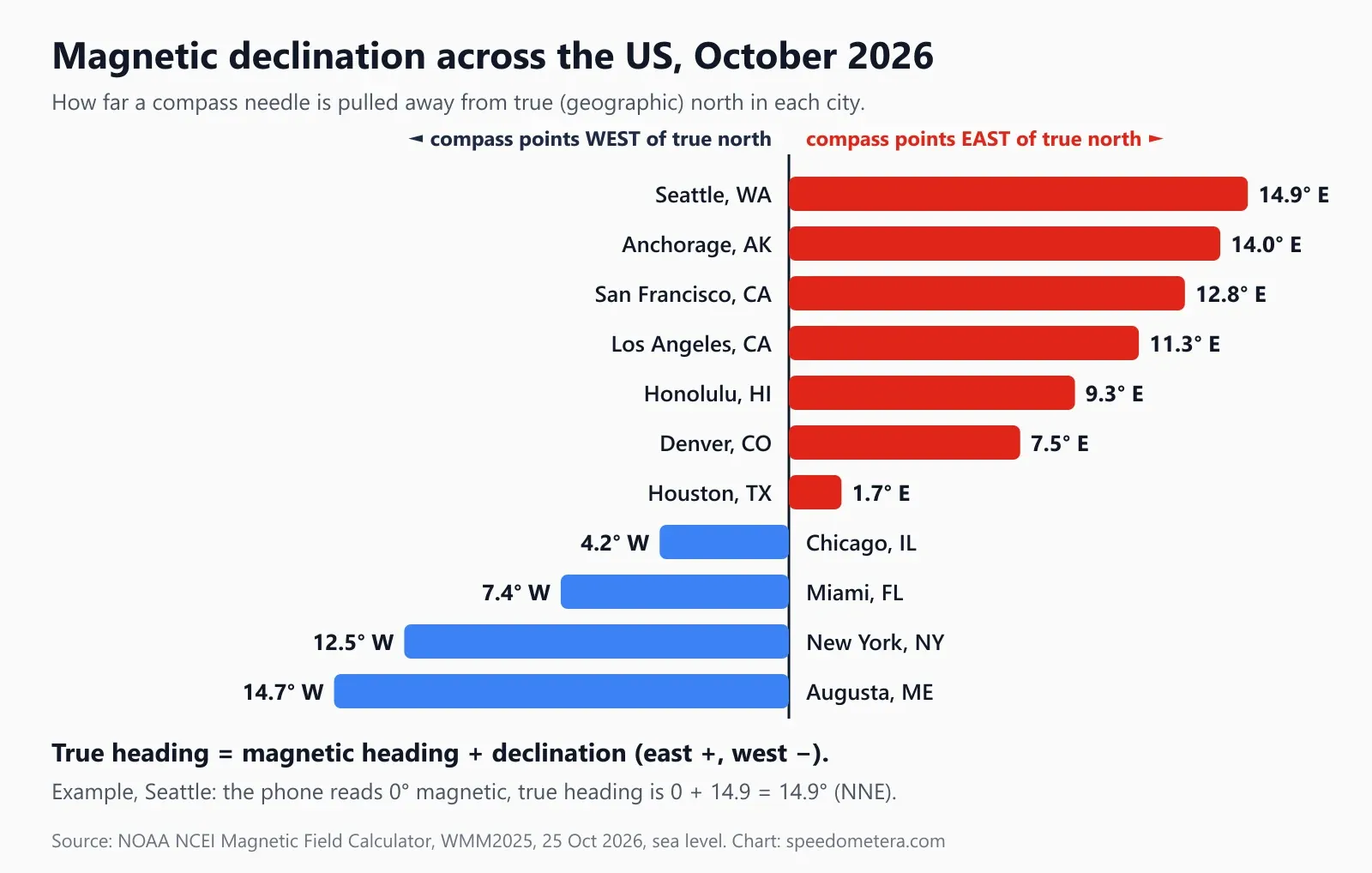
In October 2026, US declination ranges from about 15° east in the Pacific Northwest to about 15° west in Maine, and it is close to zero around Houston; get your exact value from NOAA’s free Magnetic Field Calculator. We queried NOAA’s calculator (World Magnetic Model 2025) for 11 US cities on 25 October 2026:
| City | Declination | Enter in the tool | Phone shows when you face true north | Change per year | NOAA uncertainty |
|---|---|---|---|---|---|
| Seattle, WA | 14.9° E | +14.9 | 345° NNW | −7.4′ | ±0.4° |
| Anchorage, AK | 14.0° E | +14.0 | 346° NNW | −16.9′ | ±0.4° |
| San Francisco, CA | 12.8° E | +12.8 | 347° NNW | −5.4′ | ±0.4° |
| Los Angeles, CA | 11.3° E | +11.3 | 349° NNW | −4.7′ | ±0.3° |
| Honolulu, HI | 9.3° E | +9.3 | 351° N | −2.6′ | ±0.3° |
| Denver, CO | 7.5° E | +7.5 | 353° N | −4.8′ | ±0.4° |
| Houston, TX | 1.7° E | +1.7 | 358° N | −4.8′ | ±0.3° |
| Chicago, IL | 4.2° W | −4.2 | 4° N | −1.8′ | ±0.4° |
| Miami, FL | 7.4° W | −7.4 | 7° N | −5.1′ | ±0.3° |
| New York, NY | 12.5° W | −12.5 | 12° NNE | +2.4′ | ±0.4° |
| Augusta, ME | 14.7° W | −14.7 | 15° NNE | +5.7′ | ±0.4° |
Declination and its yearly change come from NOAA (sea level, city center coordinates). “Phone shows” is the magnetic reading that equals true north, calculated with trueFromMagnetic in src/lib/compass.ts and rounded to the nearest degree. Change per year is in arcminutes (60′ = 1°); a minus sign means declination is moving west.
How to read it: standing in downtown Seattle and facing true north, the compass reads about 345°. In New York, facing true north, it reads about 12°. That is a 27° swing across the country, more than the width of a full compass point, which is why a hiker who ignores declination in the Cascades or the White Mountains can end up on the wrong ridge.
Three practical notes:
- Declination changes slowly. Anchorage moves fastest in this list, about 17 arcminutes a year, so a value is fine for a trip but worth rechecking every few years. Old paper maps print the declination for the year they were made, which can be decades out of date.
- The model has limits. NOAA’s accuracy notes say local anomalies of 3–4° “are not uncommon” over small areas, and some exceed 10°. Iron ore bodies and volcanic rock can bend the field locally.
- Your phone already knows the model. NOAA says the World Magnetic Model “comes pre-installed in Android and iOS devices”. The current version, WMM2025, was released on 17 December 2024 and is valid until the end of 2029. Native compass apps use it for their “true north” setting; a web page doesn’t get that value from the browser, which is why this tool asks you to enter it.
How accurate is a phone compass?
A calibrated phone compass held flat and away from metal is usually good to a few degrees, enough for general direction finding, but magnets, vehicles and steel structures can throw it off by 10° or much more without warning. It is a handy backup, not a replacement for a baseplate compass in serious terrain.
What a heading error means on the ground is simple trigonometry: the sideways miss equals the distance traveled × tan(error). Here is how far off course you end up for a given error:
| Heading error | Off course after 1 mile | after 3 miles | after 10 miles |
|---|---|---|---|
| 1° | 92 ft (28 m) | 276 ft | 922 ft |
| 2° | 184 ft (56 m) | 553 ft | 1,844 ft |
| 5° | 462 ft (141 m) | 1,386 ft | 4,619 ft |
| 10° | 931 ft (284 m) | 2,793 ft | 1.76 mi |
| 15° | 1,415 ft (431 m) | 4,244 ft | 2.68 mi |
| 20° | 1,922 ft (586 m) | 1.09 mi | 3.64 mi |
Calculated as distance × tan(error), 1 mile = 5,280 ft = 1,609.344 m. Uncorrected Seattle or Maine declination (about 15°) alone causes the 15° row.
The usual causes of a bad reading, roughly from most to least common:
- Magnets near the phone: magnetic cases, wallets, ring holders, car vent mounts, headphones and laptop lids. Even a small magnet within an inch or two can dominate Earth’s weak field.
- Steel and electrical current: inside a car (the body, engine and speakers), on a train, next to rebar walls, steel bridges and power equipment. In a car, use GPS course over ground from a moving online speedometer or your map app instead.
- No calibration after dropping the phone, adding a case or traveling far.
- Tilting the phone: tilt compensation helps, but readings are most stable when the phone is level.
- Uncorrected declination: not an error in the sensor, but up to about 15° of difference from your map in the lower 48 states.
- Near the magnetic poles: NOAA marks “blackout zones” around both magnetic poles, where the horizontal field is under 2,000 nT and compasses “should not be relied on for navigation”. This affects far-north Canada and Greenland, not the contiguous US.
Quick accuracy check. Find a straight road that runs exactly north–south on a map (in much of the Midwest and West, rural roads follow the north–south survey grid), stand on it and point the phone along it. The reading should match 0° or 180° plus or minus your local declination. If it is off by more than a few degrees, recalibrate.
Why isn’t the compass working on my iPhone, Android or laptop?
Most failures come from one of three things: a computer with no magnetometer, an iPhone where motion access was denied, or a browser that blocks sensors on the site. The status line under the dial tells you which.
| What you see | Likely cause | Fix |
|---|---|---|
| “No compass reading. Laptops and most desktops have no magnetometer…” | Laptop, desktop or Chromebook | Open the page on your phone |
| “Motion & orientation access was denied” | You tapped Don’t Allow on iPhone | Close the tab, reopen the page, tap Start compass and Allow |
| “This browser has no compass sensor access” | Old browser or in-app browser | Open in Safari (iPhone) or Chrome (Android) |
| “The compass needs a secure (https) page” | Page loaded over http | Use https://speedometera.com/compass/ |
| Needle spins or points the wrong way | Magnet or metal nearby, no calibration | Remove magnets, step away, do a figure 8 |
| Heading jumps when you rotate the phone sideways | Screen rotation changes | Lock portrait orientation, hold the phone flat |
iPhone and iPad. Safari asks for a permission tap before it shares motion and orientation data, and the W3C specification now requires the same thing: browsers must get “express permission” through requestPermission(), and the data is only available on secure (https) pages. The permission only appears after you tap a button, so the page can’t start the compass on its own. In-app browsers (inside social media apps) sometimes block it entirely; open the page in Safari.
Android. Chrome and most Chromium browsers supply an absolute orientation reading (relative to magnetic north) without a prompt. If nothing happens, check Chrome’s site settings for Motion sensors and make sure they are allowed.
Laptops and desktops. Some tablets and 2-in-1s have a magnetometer, but typical laptops and desktop PCs don’t, so no browser can provide a compass on them. That is a hardware limit, not something any web page can work around.
When is an online compass useful, and when should you not rely on it?
Use it for everyday direction finding: orienting a map, finding which way a window or yard faces, aiming a satellite dish roughly, or getting back to your car; don’t rely on it as your only navigation in wilderness, at sea or in the air.
Good uses:
- Orienting yourself in a city when you come out of a subway station and the map’s blue dot hasn’t settled.
- Home and garden: checking whether a window, roof or garden bed faces south (180°) for sun. Remember to add declination, because solar charts use true north.
- Hiking backup: a quick heading check or back bearing, alongside a paper map and a baseplate compass. Pair it with our altitude tool to read your elevation and the GPS odometer to track distance walked.
- On the water: a rough heading on a dock or small boat, away from engines. Boaters will also want speed in knots on the boat speed page and the knots to mph converter.
- Planning legs: once you know a heading and distance, the speed distance time calculator tells you how long each leg takes.
When not to rely on it: in whiteout, fog or unfamiliar backcountry where a mistake is dangerous; inside vehicles, boats or aircraft with steel structure and electronics; anywhere your phone battery could die. Carry a real compass and map, and know how to use them.
This compass reads your sensor only in your browser; no heading or location data is stored or sent. Headings are for general orientation, not for surveying, legal boundaries or aviation and marine navigation. Written by Izhar Ahmad Danish; declination values queried from NOAA on 25 October 2026.
Sources
- NOAA NCEI, Magnetic Declination: definition and sign convention.
- NOAA NCEI, Magnetic Field Calculators: the declination values in the city table (WMM2025, 25 Oct 2026).
- NOAA NCEI, World Magnetic Model and accuracy, limitations and error model.
- W3C, Device Orientation and Motion, Candidate Recommendation Draft, 12 February 2025.
- Google Maps Help, calibrating the compass with a figure 8.
FAQ
Frequently asked questions
Is there a compass online I can use without an app?
Yes. This page is a compass online that runs in your phone's browser: tap Start compass, allow motion access on iPhone, and hold the phone flat. It reads the same magnetometer as a compass app and shows your heading in degrees and 16 points, with no download or sign-up.
Why doesn't the online compass work on my laptop?
Most laptops and desktops have no magnetometer, so the browser has no compass data to give the page. You will see 'No compass reading' after about 5 seconds. Open the page on a phone instead: phones carry the sensor because their maps and compass apps need it.
How do I calibrate my phone compass?
Move the phone in a figure 8 a few times, rotating it through all three axes, then hold it flat again. Google's Maps help gives the same fix: make a figure 8 until the direction beam narrows. Take off magnetic cases and step 3 feet or more away from metal first.
What is the difference between true north and magnetic north?
True north points to the geographic North Pole; magnetic north is where a compass needle points. The angle between them is magnetic declination, which in October 2026 is about 14.9° east in Seattle, 4.2° west in Chicago and 12.5° west in New York (NOAA).
How accurate is a phone compass?
A calibrated phone held flat away from metal is usually good to within a few degrees, but magnets, cars and steel buildings can push it 10° or more off. Each 1° of error moves you about 92 feet sideways per mile, so check it against a known landmark before relying on it.
How do I find my magnetic declination?
Use NOAA's free Magnetic Field Calculator: enter your ZIP code or coordinates and it returns declination in degrees, east positive and west negative. Type that number into the true north panel on this page. Values change slowly, around 2 to 17 arcminutes a year in US cities.
Why does my iPhone ask for motion and orientation access?
Safari blocks compass and motion data until you allow it, in line with the W3C rule (2025 draft) that orientation data needs express permission. Tap Start compass, then Allow. If you tapped Don't Allow, close the tab and reopen the page to get the prompt again.
Which way is north on my phone compass?
North is where the red needle points. When the big number reads 0° (or between 348.75° and 11.25°, labeled N) the top edge of your phone faces magnetic north. Turn until it reads 0°, then add your declination for true north.
Does a phone compass need GPS or internet?
No. The heading comes from the magnetometer inside the phone, so it works in airplane mode and with no signal once the page has loaded. GPS only matters for maps and for working out your declination; you can enter declination by hand here.
Does my phone have a built-in compass?
Almost certainly. Nearly every smartphone has a magnetometer, the sensor a compass needs. iPhones include Apple's Compass app, which also shows coordinates and elevation. Many Android phones ship without a compass app, but the sensor is still there, so this page or Google Maps can use it straight away.
Can I pull up a compass on Google Maps?
Partly. In Google Maps the blue dot carries a beam pointing the way your phone faces; Google says a narrow beam means good accuracy and a wide one means the compass may need calibrating. It shows no degrees or bearing, so use the compass above when you need an exact heading.
8 Sources
- NOAA NCEI: Magnetic Declination (definition, east-positive sign convention)
- NOAA NCEI: Magnetic Field Calculators (declination by ZIP code or coordinates; values on this page queried 25 Oct 2026)
- NOAA NCEI: World Magnetic Model (WMM2025, released 17 Dec 2024, valid to end of 2029; built into Android and iOS)
- NOAA NCEI: WMM accuracy, limitations and error model (anomalies, blackout zones)
- W3C: Device Orientation and Motion (Candidate Recommendation Draft, 12 Feb 2025)
- Google Maps Help: Fix location accuracy, calibrate the compass with a figure 8 (Android)
- Google Maps blog (Sep 2016): Always know which way you're headed (blue-dot direction beam)
- Apple iPhone User Guide: Use the compass on iPhone
Last updated October 25, 2026 by Izhar Ahmad Danish. Found an error? Tell us.