



Key numbers
- Windshield glass reflects about 4–9% of a phone screen's light at typical angles, so a phone HUD is clear at night and faint in sunshine
- NHTSA's guideline for in-car displays: single glances away from the road of 2 seconds or less, 12 seconds total per task
- At 55 mph you cover 161 ft in a 2-second glance
- 3,208 people were killed in US crashes involving distracted drivers in 2024 (NHTSA)
- No download: the HUD runs in Chrome or Safari, and location never leaves your phone
On this page
- How to use the HUD Speedometer
- What is a HUD app?
- How do I set up a phone HUD in my car?
- How does a HUD app work on the windshield?
- How do I make a phone HUD readable at night and in daylight?
- Is a HUD app legal and safe to use while driving?
- Phone HUD app vs built-in HUD: which is better?
- How accurate is the speed on a HUD app?
- What else should I know before using HUD mode?
- Frequently asked questions
How to use the HUD Speedometer
- 1Get a clear view of the skyMount your phone in a holder with a clear view of the sky before you set off.
- 2Tap Start and allow locationYour browser asks for location permission once. The first GPS fix usually arrives in 5–30 seconds.
- 3Pick your unitChoose km/h, mph, knots or m/s. Your choice is remembered on this device.
- 4Place the phone under the windshieldAfter Start the display mirrors and goes full screen. Lay the phone flat on the dash so the reflection reads correctly; tap HUD mirror to exit.
- 5Stop or resetTap Stop to pause, Reset to clear the trip. Nothing is stored or sent anywhere.
Works in any modern phone browser. Back to the speedometer ↑
What is a HUD app?
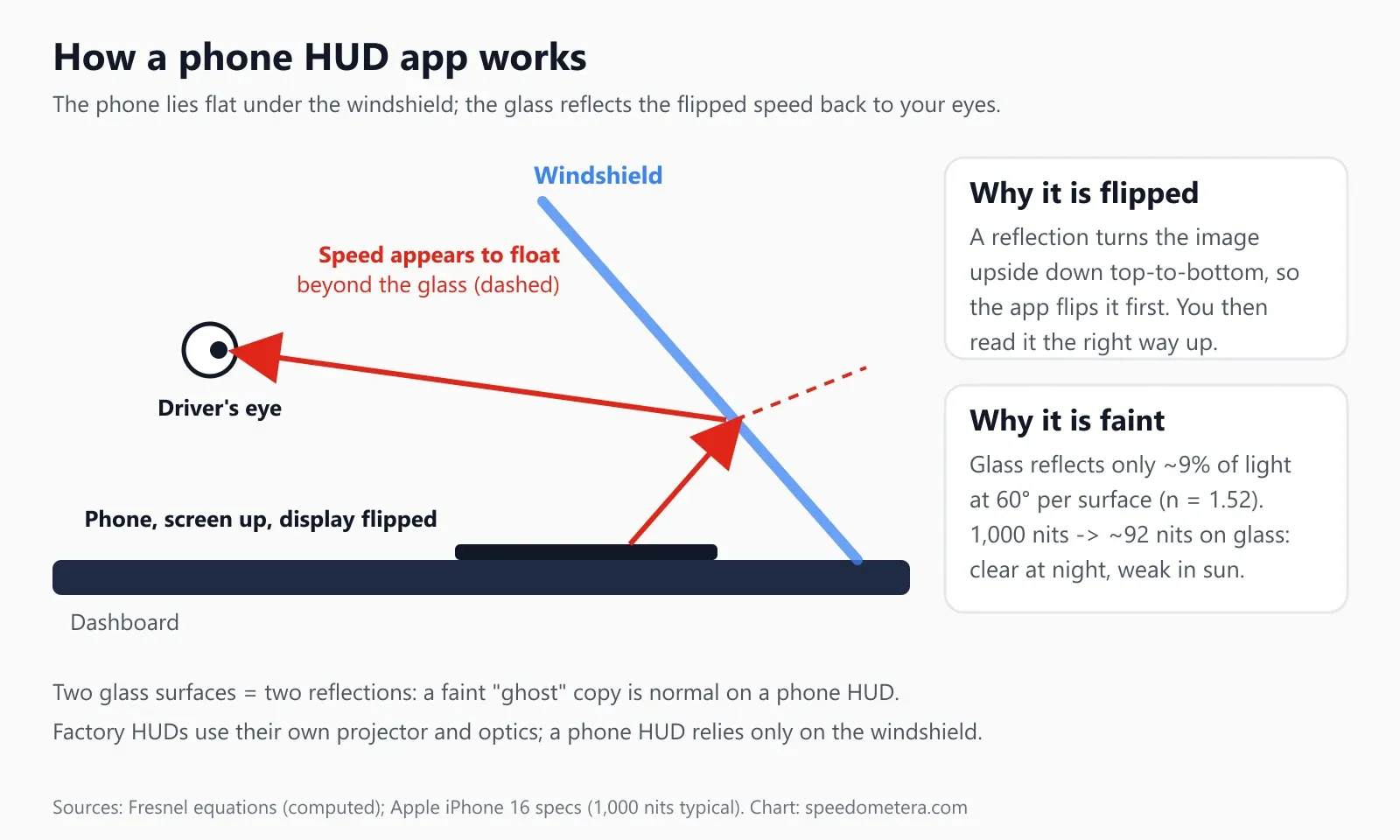
A HUD app turns your phone into a head-up display: it shows your speed flipped top to bottom, so when the phone lies flat under the windshield, the glass reflects a readable speed into your line of sight. You keep your eyes up, near the road, instead of looking down at the dashboard or a phone mount.
The speedometer above is a free HUD app that runs in the browser. There’s nothing to install, no account and no subscription. It reads speed from your phone’s GPS, the same way the online speedometer on our homepage does, and adds a HUD mode: when you tap Start, the display goes black, flips vertically and switches to full screen where the browser allows it.
Key terms on this page. HUD (head-up display): any display that puts information in your forward view. Phone HUD or HUD app: a phone screen reflected in the windshield. Factory HUD or built-in HUD: a projector unit built into the car’s dashboard by the automaker. Nits (cd/m²): screen brightness. Ghosting: the faint second image a windshield’s outer surface adds. GPS speed: speed over ground computed by the phone’s satellite receiver.
How do I set up a phone HUD in my car?
Park first, set screen brightness to maximum, tap Start, allow location, then lay the phone screen-up on the dash about 4–8 inches behind the base of the windshield, with the top of the phone pointing toward you. Adjust the position until the reflected numbers sit low in your view, just above the hood line.
Step by step, with the car parked:
- Open this page and tap Start. Your browser asks for location once. Choose “Allow” and, on iPhone, make sure Precise Location is on for Safari (Settings, Privacy & Security, Location Services, Safari Websites).
- Wait for the first fix. It usually takes 5–30 seconds with a clear view of the sky. The status line under the gauge tells you when the reading is good.
- Lay the phone flat on the dash, screen up, below the windshield. The top edge of the phone should point toward the driver’s seat. In the reflection, the image then reads correctly. If the numbers look mirrored left to right, rotate the phone 180°.
- Fine-tune the spot from the driver’s seat. Slide the phone forward or back until the speed appears in the lower part of the glass, outside the area you need to see the road ahead. Don’t put it where it covers the windshield’s driver-side view.
- Secure it. A non-slip dashboard mat or a low-profile HUD pad keeps the phone flat. A phone that slides under braking is a distraction in itself.
- Exit with the HUD mirror button when you stop, or tap Stop to pause tracking. Tap HUD mirror again to switch the flip back on.
Which way up?
The reflection flips the image top to bottom, not left to right. That’s why the page applies a vertical flip only. If you see backwards digits, the phone is rotated wrong on the dash; turn it end for end rather than looking for a different setting.
The tool keeps every regular speedometer feature in HUD mode: unit choice (mph, km/h, knots, m/s), max and average speed, trip distance, a speed-limit alert that beeps above the speed you set, and GPX export of the trip. Distance tracking is the same engine as our trip odometer.
How does a HUD app work on the windshield?
Windshield glass acts as a weak mirror: it reflects a small share of the screen’s light back toward you, and because a reflection reverses the image top to bottom, the app pre-flips the display so it reads the right way up. The phone does the work of a projector; the glass does the work of a combiner.
How much light comes back depends on the angle at which the screen’s light hits the glass. Windshields are steeply raked, so light from a phone on the dash meets the glass at a fairly high angle of incidence. We computed the share reflected by one glass surface with the Fresnel equations (unpolarized light, glass refractive index 1.52), then applied it to two screen brightness levels from Apple’s iPhone 16 specifications: 1,000 nits typical maximum and 2,000 nits peak outdoors.
| Angle of incidence on glass | Light reflected (one surface) | Reflection from a 1,000-nit screen | Reflection from a 2,000-nit screen |
|---|---|---|---|
| 0° (straight on) | 4.3% | 43 nits | 85 nits |
| 30° | 4.4% | 44 nits | 88 nits |
| 45° | 5.3% | 53 nits | 106 nits |
| 60° | 9.2% | 92 nits | 185 nits |
| 65° | 12.4% | 124 nits | 248 nits |
| 70° | 17.5% | 175 nits | 349 nits |
Calculated by speedometera.com (script scripts/scenes/hud.mjs). Real windshields add tint, coatings and a plastic interlayer, so treat these as best-case figures for clean, clear glass. Two practical lessons fall out of the table. First, a phone HUD is always much dimmer than the phone itself: you see roughly a tenth of the screen’s brightness, or less. Second, a steeper windshield (a higher angle) reflects more, which is why the same phone looks brighter on a sports car’s raked glass than on an upright truck windshield.
The numbers float. Because a flat reflection forms a virtual image behind the glass, the speed appears to sit a short distance beyond the windshield rather than on it. Your eyes still have to refocus from the road to the reading, but less than they do for a dashboard gauge.
Why there’s a ghost image. A windshield has two glass surfaces, inside and outside, and each reflects the screen. The second reflection is offset by a few millimeters, so you see a main image with a fainter copy beside it. That’s physics, not a bug in the app. Factory HUDs address it with special optics; a phone HUD can only make it less noticeable with a bold, high-contrast display, which is why the HUD view uses large white digits on pure black.
How do I make a phone HUD readable at night and in daylight?
At night, lower the brightness until the reflection is just readable, so it doesn’t spoil your night vision; in daylight, use maximum brightness, a dark dashboard surface and, ideally, a reflective HUD film, and accept that direct sun will wash it out. The phone screen’s black background matters too: any light from black areas turns into a gray haze on the glass.
| Situation | What to do | Why |
|---|---|---|
| Night, unlit road | Brightness 30–60%, then adjust down | A bright reflection lowers your eyes’ dark adaptation and adds glare |
| Night, city streets | Brightness 60–80% | Streetlights and signs compete with the reflection |
| Dusk, overcast | Maximum brightness | The reflection is 4–9% of the screen; you need every nit |
| Bright sun | Maximum brightness, or don’t use HUD mode | Even a 2,000-nit peak gives under 200 nits on glass at 60° (table above) |
| Polarized sunglasses | Take them off or rotate your head | Glass reflections are partly polarized, so polarized lenses can dim the image a lot |
| Hot day, sun on the dash | Use the HUD briefly or keep the phone shaded | Phones dim the screen or pause when they overheat, and the dashboard gets hot fast |
Turn off auto-brightness if the reflection keeps fading. Your phone’s light sensor faces up at the bright sky, so in daytime it can turn brightness down at the wrong moment, and at night it may not go low enough. Set brightness by hand for the drive.
A dashboard mat helps twice. A black, non-slip mat stops the phone sliding and hides the bright dash surface that would otherwise reflect too.
HUD film. Small transparent reflective films stick to the inside of the windshield where the reflection lands. They boost the reflected light and reduce the ghost image. Place one only in a spot that doesn’t block your view, and check your state’s rules on windshield stickers first (see the legal section below).
Is a HUD app legal and safe to use while driving?
A phone lying on the dash and showing speed is legal in most US states if you don’t hold or operate it while driving, but rules differ by state, and the safe way to use any HUD is to set it up while parked and never touch it on the move. The point of a HUD is fewer and shorter glances away from the road. It doesn’t make handling a phone at the wheel safe.
The numbers behind that rule are stark. NHTSA counted 3,208 people killed and an estimated 315,167 injured in US crashes involving distracted drivers in 2024, and 8% of fatal crashes were reported as distraction-affected (NHTSA research note, April 2026). NHTSA’s driver distraction guidelines for in-car screens set a target of single glances away from the road of 2 seconds or less and no more than 12 seconds of total eyes-off-road time per task. GHSA notes that reading a text takes the eyes off the road for about 5 seconds on average.
Here’s what those glances mean in distance, calculated with the site’s exact conversion code (1 mile = 5,280 ft):
| Speed | km/h | Feet per second | 2 s glance | 5 s glance | 12 s total |
|---|---|---|---|---|---|
| 25 mph | 40 | 36.7 ft | 73 ft | 183 ft | 440 ft |
| 35 mph | 56 | 51.3 ft | 103 ft | 257 ft | 616 ft |
| 45 mph | 72 | 66.0 ft | 132 ft | 330 ft | 792 ft |
| 55 mph | 89 | 80.7 ft | 161 ft | 403 ft | 968 ft |
| 65 mph | 105 | 95.3 ft | 191 ft | 477 ft | 1,144 ft |
| 75 mph | 121 | 110.0 ft | 220 ft | 550 ft | 1,320 ft |
At highway speed, a 5-second look at a phone is a football field and more of road you didn’t see. A HUD aims to cut each glance to a fraction of a second, but only if you never need to touch the phone. Set the unit, the speed alert and the position before you put the car in gear.
What US law says. According to the GHSA state law overview (updated October 2025), 33 states, D.C. and several territories ban handheld phone use for all drivers, and 49 states and D.C. ban texting for all drivers. 36 states and D.C. ban all phone use by novice drivers, which can include touching a mounted phone. Hands-free laws usually allow a mounted phone you operate with minimal touches. Two examples from California show how specific the wording can be:
- Vehicle Code 23123.5 allows a phone mounted or affixed on the dashboard or center console in a manner that does not hinder the driver’s view of the road, and the driver may operate it only with a single swipe or tap.
- Vehicle Code 26708 limits windshield-mounted GPS devices to a 7-inch square in the lower corner farthest from the driver or a 5-inch square in the lower corner nearest the driver, outside the airbag zone. It is also the section that restricts stickers and films on the windshield.
A phone lying flat on a dash mat sits on the dashboard, not the windshield, but the reflection itself must still not hinder your view. Other states word their rules differently, so check your state DMV or state highway safety office before you rely on a HUD. Commercial drivers have stricter federal rules on phone use. If you’re a new driver under a full phone ban, don’t use a phone HUD at all.
Ground rules
Set everything up while parked. Never touch the phone while moving; let a passenger change settings. Keep the reflection low and out of your main view of the road. If the phone slides, pull over before you fix it. Your car’s speedometer is the legal reference, not a GPS reading.
Phone HUD app vs built-in HUD: which is better?
A factory HUD is brighter, sharper and readable in daylight; a phone HUD app is free, works in any car and shows true GPS speed, but it’s dim in sunshine and can double up. For night driving and older cars without a HUD, a phone does the basic job well.
| Feature | Phone HUD app (this page) | Built-in (factory) HUD | Add-on HUD unit |
|---|---|---|---|
| Cost | Free | Part of a trim or option package | Bought separately |
| Light source | Phone screen, reflected at about 4–9% | Dedicated projector built for the job | Its own display or projector |
| Daylight visibility | Poor in direct sun | Designed for daylight use | Varies by model |
| Ghost image | Usually visible | Reduced with special optics | Often reduced with a film or combiner screen |
| Speed source | GPS (speed over ground) | The car’s own speed signal | GPS or the car’s OBD-II port, by model |
| Other info | Speed, max, average, distance, speed alert | Often navigation, driver-assist and media | Varies |
| Setup | Lay phone on dash each trip | None | Mount, cable, sometimes film |
| Phone available for calls and maps | No, while it’s the HUD | Yes | Yes |
A useful side effect of GPS speed: it shows how fast you are really going. Dashboard speedometers are often set to read a little high, so a GPS HUD can show a slightly lower number than the gauge. Our guide to GPS vs car speedometer explains why, and the speedometer calibration calculator turns a GPS reading into your speedometer’s error in percent. If you’ve fitted bigger or smaller tires, the tire size calculator shows how much that changes the gauge.
How accurate is the speed on a HUD app?
On open road, a phone HUD’s GPS speed is typically steady to within a mile per hour or so once the fix is good, since satellite speed error is under 0.02 mph; it can lag by a second or so when you brake or accelerate hard, and it drops out in tunnels and parking garages. GPS speed comes from the Doppler shift of satellite signals, which is far more precise than GPS position.
GPS.gov puts typical smartphone position accuracy at 4.9 m (16 ft) under open sky, worse near tall buildings, bridges and trees, and the GPS signal-in-space speed error at 0.006 m/s or less over any 3-second interval (95% probability). In practice, the phone’s antenna and its place in the car decide how good your reading is. A phone flat on the dash under the windshield has one of the best views of the sky in the car, which is a bonus of HUD mode.
| Where you’re driving | What the HUD shows |
|---|---|
| Open highway, steady speed | Steady reading, typically within a mile per hour or so |
| Downtown between tall buildings | Small jumps, slower updates |
| Under overpasses and bridges | Brief drop of a second or two |
| Tunnels, parking garages | No reading; resumes within seconds of open sky |
| Hard braking or acceleration | Number lags about 1 second |
| First minute after Start | May read zero until the first good fix |
Speed is also smoothed slightly so the number doesn’t flicker on the glass. If you’d rather see the readings in another unit, switch under the gauge, or use the mph to km/h converter to check a figure: 65 mph is 104.6 km/h.
What else should I know before using HUD mode?
Keep the tab open and in front, keep the phone charged, and expect iPhone to flip the display without going fully full screen. Browser rules differ between Android and iPhone, and they explain most “it stopped working” reports.
Full screen on iPhone. Safari on iPhone doesn’t let web pages enter true full screen; MDN’s compatibility data lists requestFullscreen() as iPad-only on iOS. On iPhone, the HUD still mirrors and turns black, and rotating the phone or adding the page to your Home Screen gives the display more room. Chrome on Android goes fully full screen on Start.
The screen must stay on. A reflection disappears when the screen sleeps. The page requests a screen wake lock, which keeps the display awake while the tab is visible. MDN lists support in Chrome for Android from version 84 and in Safari on iOS from 18.4. If your phone is older, set Auto-Lock to a longer time for the drive. Switching to another app releases the lock; the page asks for it again when you come back.
Battery and heat. GPS plus a full-brightness screen is one of the heaviest loads a phone handles. Plug it into a car charger on drives longer than about half an hour, and take it off a sun-baked dash when you park. If the phone gets hot, it dims the screen to protect itself, and the HUD fades with it.
Privacy. Speed and distance are calculated in your browser. Your location isn’t sent to our servers or stored after you close the page. See the privacy policy.
Pair it with other tools. For off-road trips, the GPS altitude meter shows height above sea level and climb, and the online compass gives your heading. For a mileage log, the trip odometer adds up distance while you move.
FAQ
Frequently asked questions
Is there a free HUD app for the car?
Yes. This page is a free HUD app that runs in your phone's browser, with no download or account. Tap Start, allow location, and lay the phone under the windshield. Your GPS speed shows mirrored, in mph or km/h, and updates each time the phone reports a new GPS fix, typically about once a second.
How do I turn my phone into a HUD?
Use an app with a mirror mode, set brightness to 100%, and lay the phone flat on the dash about 4–8 inches behind the base of the windshield. On this page, tapping Start flips the display automatically so the reflection reads the right way round.
Why is my phone HUD hard to see during the day?
Glass reflects only about 4–9% of the light that hits it at dashboard angles, so a 1,000-nit screen gives a reflection of roughly 40–90 nits. That is clear at night but weak against a bright sky. Use the HUD after dusk or on overcast days.
Why do I see two images on the windshield?
A windshield has two glass surfaces, inner and outer, and each reflects the screen, so you see a main image plus a fainter ghost offset by a few millimeters. It is normal for a phone HUD. Factory HUDs use special optics to reduce it.
Is there a HUD app for iPhone and Android?
Yes, this page works on both with no download. Chrome on Android goes fully full screen and keeps the screen awake from Chrome 84. Safari on iPhone mirrors the speed and keeps the screen on from iOS 18.4, but web pages cannot go true full screen on iPhone, so rotate the phone or add the page to your Home Screen.
Can a HUD app show navigation directions?
This one shows speed only: a large mirrored mph or km/h reading, with an optional speed alert. That keeps the reflection simple enough to read at a glance. If you need turn-by-turn directions, run a navigation app on a mount instead; don't stack a second phone or glance down at a map while driving.
Is it legal to use a phone HUD while driving?
It depends on your state. 33 states and D.C. ban handheld phone use for all drivers (GHSA, 2025), while most allow a mounted phone used with a single tap. California, for example, allows a phone on the dashboard if it does not block your view. Check your state's law.
Does a HUD app work with the phone screen locked?
No. The screen must stay on for the reflection to exist. This page asks the phone to stay awake with the Screen Wake Lock API, supported in Chrome for Android since version 84 and Safari on iPhone since iOS 18.4. Keep the tab open in the foreground.
Does the HUD app use mobile data?
Hardly any. After the page loads, speed comes from the phone's GPS receiver, which needs no data connection. GPS speed from the satellites is accurate to 0.006 m/s over 3 seconds, so the reading on the glass stays steady even with no signal bars.
Is a phone HUD as good as a built-in head-up display?
No. A factory HUD has its own bright projector and optics that place the image a few feet beyond the glass, readable in daylight. A phone HUD costs nothing and shows GPS speed, but it is dim in sunshine, can show a double image and must stay flat on the dash.
9 Sources
- NHTSA: Distracted Driving in 2024, Research Note DOT HS 813 790 (April 2026)
- NHTSA: Visual-Manual Driver Distraction Guidelines for In-Vehicle Electronic Devices, 78 FR 24818 (April 2013)
- GHSA: Distracted driving, state laws overview (updated October 2025)
- California Vehicle Code 23123.5: mounted phones, single swipe or tap
- California Vehicle Code 26708: windshield obstructions and GPS mounting zones
- GPS.gov: GPS accuracy (smartphones and speed accuracy)
- Apple: iPhone 16 technical specifications (display brightness)
- W3C: Screen Wake Lock API
- MDN: Element.requestFullscreen() browser compatibility
Last updated October 25, 2026 by Izhar Ahmad Danish. Found an error? Tell us.