



Key numbers
- Phone GPS is typically accurate to 16 ft (4.9 m) under open sky (GPS.gov)
- IRS business rate 2026: 72.5¢/mile Jan–Jun, 76¢/mile from July 1
- Standing still: below 1.12 mph the odometer adds no distance and no moving time
- Fixes worse than 50 m (164 ft) accuracy are ignored for distance
- 1 mile = 1.609344 km exactly; 100 mi = 160.9 km
On this page
- How to use the Trip Odometer
- What is a GPS distance tracker?
- How do I track distance traveled on my phone?
- How accurate is GPS distance tracking?
- Why does GPS distance differ from my car’s odometer?
- How do I keep a mileage log for the IRS?
- How do I export my trip as a GPX file?
- What can I track: driving, walking, running or cycling?
- Is a browser distance tracker private and battery-friendly?
- Frequently asked questions
How to use the Trip Odometer
- 1Get a clear view of the skyMount your phone in a holder with a clear view of the sky before you set off.
- 2Tap Start and allow locationYour browser asks for location permission once. The first GPS fix usually arrives in 5–30 seconds.
- 3Pick your unitChoose km/h, mph, knots or m/s. Your choice is remembered on this device.
- 4Read your trip distanceThe odometer adds up GPS distance only while you move and ignores jitter while you stand still. Copy distance copies the total and moving time.
- 5Stop or resetTap Stop to pause, Reset to clear the trip. Nothing is stored or sent anywhere.
Works in any modern phone browser. Back to the speedometer ↑
What is a GPS distance tracker?
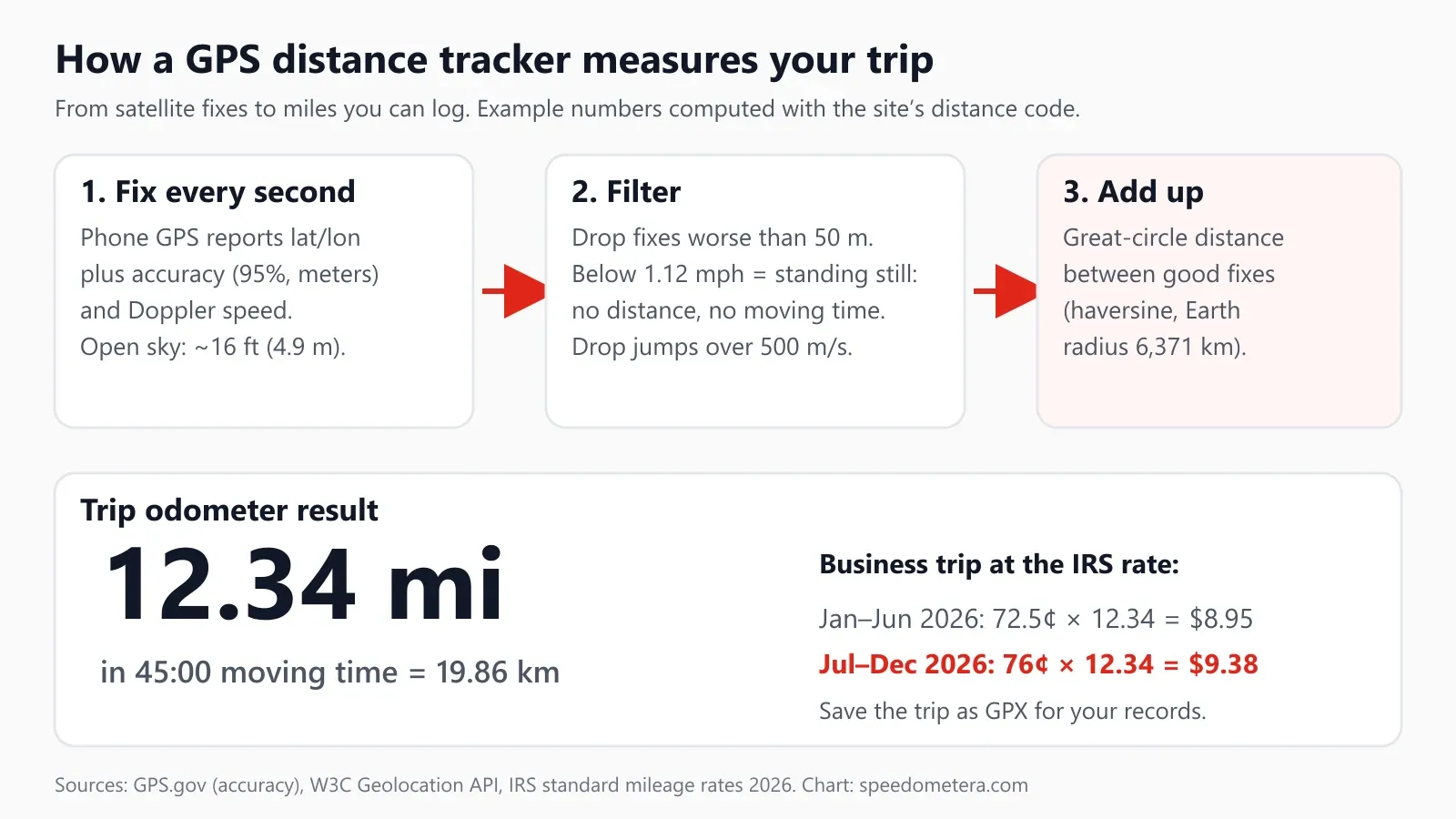
A distance tracker is a trip odometer that runs on your phone’s GPS instead of your wheels: it records your position about once a second and adds up the distance between points, in miles or kilometers. The one above works in the browser, so there is nothing to install, no account and no subscription. It shows three numbers in the Trip odometer panel: total distance, moving time, and a Copy distance button that puts a line such as “12.34 mi in 45:00 moving time” on your clipboard, ready to paste into a mileage log, a note or a text message.
Under the trip panel you get the standard online speedometer with live speed, maximum, average and a speed chart, so one screen covers “how far” and “how fast.”
Key terms used on this page. Fix: one position reading from the GPS chip (latitude, longitude, time, accuracy). Accuracy: the radius, in meters, within which the true position lies with 95% confidence, as the W3C Geolocation API defines it. Moving time: time counted only while you are above walking-shuffle speed. Trip odometer: a resettable distance counter, as opposed to the car’s total odometer. GPX: the GPS Exchange Format, an open XML file for tracks. Standard mileage rate: the IRS cents-per-mile figure for deducting vehicle use.
Who uses a GPS trip odometer like this:
- Gig and field workers (delivery, rideshare, home health, real-estate showings) who need business miles for taxes or reimbursement.
- Drivers checking their car against a known distance, or comparing the dashboard odometer with GPS after a tire change.
- Walkers, runners and cyclists who want distance without a fitness app (pair it with the pace calculator).
- Travelers on trains, ferries and buses who want to know how far they have come.
How do I track distance traveled on my phone?
Open this page, tap Start, allow location, and keep the screen on: the trip odometer starts counting the moment you move. The steps, in order:
- Open the page before you set off so it loads while you have signal. After that, GPS needs no mobile data.
- Tap Start and allow location. On iPhone, Safari asks once per site; on Android, Chrome asks the same. If you said no earlier, re-enable location for this site in the browser settings.
- Wait for a good fix. The accuracy line under the gauge shows the current radius. Outdoors the first fix usually arrives within 5–30 seconds and then tightens; distance only counts once fixes are better than 50 m (164 ft).
- Read your trip distance. The big number in the Trip odometer panel is your total in miles (US and UK) or kilometers (elsewhere); tap the unit buttons to switch. Moving time sits beneath it. Tap Copy distance to copy both.
- Save the trip. When you arrive, tap Save trip (GPX) to download the track, or copy the distance into your log. Reset starts a new trip.
Don't touch the phone while driving
Set the tracker up before you pull away, mount the phone hands-free or hand it to a passenger, and follow your state’s hands-free law. Copy the distance after you have parked.
Two browser rules matter. First, the W3C Geolocation API only delivers position updates to visible pages, so a locked screen or switching to another app pauses the count (the total is kept, and counting resumes when you come back). Second, the page must be served over HTTPS and you must grant permission; it cannot track you without that. If you need a big, glanceable display at night, the HUD speedometer mirrors the readout for your windshield.
Once you know the distance, the fuel cost calculator turns it into gallons, total cost and cost per mile. To convert a trip reading, 1 mile is exactly 1.609344 km; the miles to km converter does any distance.
How accurate is GPS distance tracking?
At highway speeds phone GPS distance is the most reliable it gets, with error of a few percent at most; at walking pace in a city it can over-read by far more. The reason is how error behaves. GPS.gov says GPS-enabled smartphones are “typically accurate to within a 4.9 m (16 ft.) radius under open sky,” and that accuracy worsens near buildings, bridges and trees, mostly from blocked signals and multipath (signals bouncing off walls).
A position error of a few meters does not matter much on its own: a 12-mile trip is 19,312 m long. What adds distance is zigzag. Every fix lands a little left or right of your real path, and a tracker that joins the dots draws a path longer than the one you traveled. The slower you go, the shorter each real step between fixes, and the larger the zigzag is by comparison.
We ran that effect through this page’s own distance code (the same addFix function the tool uses) with a simulated straight 1-mile route and random position noise on every one-second fix, averaged over 50 runs. This is a deliberately harsh model: real receivers filter their output and their errors drift slowly rather than jumping independently every second, so treat the numbers as an upper bound that shows the pattern, not a lab measurement.
| Position noise per fix | Walking 3 mph (4.8 km/h) | Cycling or city 15 mph (24 km/h) | Road 30 mph (48 km/h) | Highway 60 mph (97 km/h) |
|---|---|---|---|---|
| 1 m (3.3 ft), very clean sky | +60.2% | +2.2% | +0.6% | +0.1% |
| 2.5 m (8.2 ft) | +243% | +15.3% | +3.5% | +0.9% |
| 5 m (16 ft), similar in size to the GPS.gov open-sky figure | +567% | +60.5% | +15.0% | +3.4% |
What the table tells you in practice:
- Driving is the easy case. At 30–60 mph each second covers 13–27 m (44–88 ft), so a few meters of wobble barely bends the line. Highway trip distances are the most trustworthy numbers a phone tracker produces.
- Walking is the hard case. At 3 mph you move only 1.3 m (4.4 ft) per second, smaller than the noise, which is why walking apps lean heavily on smoothing and step counters. For a walk, use the tracker on open paths, and sanity-check against a known distance such as a 400 m track (four laps is 1,600 m, just short of a mile). Our average walking speed guide has typical paces to compare against.
- Cities and forests are worse than the open-sky figure. Downtown streets between tall buildings and dense tree cover push the error up and make jumps more likely.
Corners: why GPS can also under-count
The opposite error comes from sampling: a tracker joins fixes with straight lines, so on a curve it cuts the corner. With fixes every second the loss is tiny, but trackers that save battery by recording every 5 or 10 seconds lose real distance on twisty roads. We measured it by sampling a 90-degree curve with the same great-circle (haversine) code:
| Curve | Fix every 1 s | Fix every 5 s | Fix every 10 s |
|---|---|---|---|
| Tight city corner at 15 mph, 25 m (82 ft) radius | −0.29% | −6.3% | −10.0% (one straight line across) |
| Street bend at 25 mph, 50 m (164 ft) radius | −0.21% | −3.9% | −10.0% (one straight line across) |
| Ramp at 45 mph, 200 m (656 ft) radius | −0.04% | −1.0% | −3.1% |
| Highway curve at 65 mph, 400 m (1,312 ft) radius | −0.02% | −0.5% | −2.0% |
This page asks the browser for a fresh fix as often as the device delivers it, typically about once a second, which keeps corner loss well under 1%. On a long drive the two effects partly cancel: zigzag adds a little, corners remove a little.
What this tracker filters out
The tool uses three rules, all in the site’s tested distance code:
- Bad fixes are skipped. Any fix whose reported accuracy is worse than 50 m (164 ft) adds no distance. This happens in parking garages, tunnels and the first seconds after Start.
- Standing still counts as zero. Below 0.5 m/s (1.12 mph) you are treated as stopped, so no distance and no moving time are added. This works best when the phone reports its own Doppler speed (most do): in a simulated 10-minute stop with 16 ft of jitter on every fix and a reported speed of zero, the tracker added 0 m. If a device reports no speed, the page has to derive it from jittery positions, and some phantom distance can slip through; simply joining the same kind of jittery points would have added 5,362 m, or 3.33 miles of phantom distance.
- Impossible jumps are rejected. A jump implying more than 500 m/s (about 1,118 mph) is thrown away, so a single wild fix cannot add a mile.
Speed itself comes from the chip’s Doppler measurement where the phone provides it, and from position change otherwise; we explain the difference in GPS vs car speedometer.
Why does GPS distance differ from my car’s odometer?
Your car’s odometer counts wheel rotations and assumes a tire size, while GPS measures your path over the ground, so the two rarely agree exactly; a gap of a few percent is common. A difference on its own does not mean either one is broken; test against mile markers (below) to find out which is off.
Common reasons, from biggest to smallest:
- Tire size and wear. The odometer is tuned for the factory tire’s rolling circumference. Larger aftermarket tires make each turn cover more ground, so the odometer under-reads; worn tread makes the tire slightly smaller and the odometer over-reads. The tire size calculator shows how much a size change shifts the reading, and speedometer calibration covers correcting it.
- Signal gaps. In tunnels and garages GPS pauses while the wheels keep turning, so GPS reads short.
- Zigzag and corners as described above.
- Hills. A GPS track measures horizontal distance; on a long, steep grade the road distance is a little longer. For ordinary roads the difference is a small fraction of a percent.
For a fair test, use a stretch with mile markers on open highway, reset both trip meters at one marker, drive at a steady speed and compare after 10 markers. Divide the difference by 10 to get your error per mile.
How do I keep a mileage log for the IRS?
Record each business trip’s miles, date, destination and business purpose at or near the time of the trip, and total your miles for the year; a GPS distance tracker gives you the miles. That is what IRS Publication 463 asks for: for car expenses, “the mileage for each business use, and the total miles for the year,” the date of use, your business destination and the business purpose. It also notes that a record made at the time “has more value than a statement prepared later.”
The IRS rate changed mid-year in 2026. According to the IRS standard mileage rates page:
- Business: 72.5 cents per mile from January 1 to June 30, 2026, then 76 cents per mile from July 1 to December 31, 2026 (it was 70 cents for all of 2025).
- Medical and military moving: 20.5 cents, then 23.5 cents from July 1.
- Charitable: 14 cents all year (set by law).
What common business distances are worth at each 2026 rate:
| Business miles | Kilometers | Jan 1–Jun 30, 2026 (72.5¢) | Jul 1–Dec 31, 2026 (76¢) |
|---|---|---|---|
| 1 mi | 1.6 km | $0.73 | $0.76 |
| 10 mi | 16.1 km | $7.25 | $7.60 |
| 25 mi | 40.2 km | $18.13 | $19.00 |
| 50 mi | 80.5 km | $36.25 | $38.00 |
| 100 mi | 160.9 km | $72.50 | $76.00 |
| 500 mi | 804.7 km | $362.50 | $380.00 |
| 1,000 mi | 1,609.3 km | $725.00 | $760.00 |
| 5,000 mi | 8,046.7 km | $3,625.00 | $3,800.00 |
| 10,000 mi | 16,093.4 km | $7,250.00 | $7,600.00 |
Use the rate for the date of the trip: 1,000 business miles in March are worth $725, the same miles in September $760. A quick worked example: a real-estate agent drives 12.34 miles to a showing on October 6, 2026. At 76 cents that entry is worth $9.38.
A simple log that meets those elements has these columns, and Pub 463’s sample log uses the same idea (date, destination, purpose, odometer start and end, miles):
| Date | From → to | Business purpose | GPS miles | Odometer start / end (optional) | Parking and tolls |
|---|---|---|---|---|---|
| 2026-10-06 | Office → 14 Elm St | Client showing | 12.34 | 48,201 / 48,213 | $4.00 |
Rules worth knowing from Publication 463 and the IRS 2026 rate announcement (check it or a tax professional for your situation):
- Commuting is not deductible. The IRS says “You can’t deduct commuting expenses no matter how far your home is from your regular place of work.” Don’t log the home-to-office drive as business.
- Parking and tolls are extra. “In addition to using the standard mileage rate, you can deduct any business-related parking fees and tolls.”
- Choose the method early. Per IR-2025-128, for a car you own, you must use the standard rate in the first year the car is used for business if you want it later; for a leased car, you must stick with it for the whole lease.
- Keep the records. Generally for 3 years from the date you file the return that claims the deduction.
A GPS log you can back up
Copy distance gives the number for your log; Save trip (GPX) gives a timestamped track of the same trip. Keep the GPX files in a folder per month so you can show where and when you drove if you are ever asked.
This tool records the miles; it does not file anything, classify trips or give tax advice. Many employers reimburse at the IRS rate, but your company’s policy decides.
How do I export my trip as a GPX file?
Tap Save trip (GPX) when the trip ends: the browser downloads a GPX 1.1 file with one track point per good fix (thinned evenly on very long trips), including latitude, longitude, time and elevation where available. GPX is an open XML format documented by TopoGrafix. Its coordinates use the WGS84 datum (the same as GPS), measurements are metric, and times are standard XML date-times, so the file opens almost anywhere.
What you can do with the file:
- Import it into fitness apps such as Strava or Garmin Connect to keep a walk, run or ride with your other activities.
- View it on a map in Google Earth or any GIS tool to check the route you took.
- Archive it next to your mileage log as supporting evidence for a business trip.
- Measure legs of a trip with the speed, distance and time calculator, for example to work out average speed between two stops.
The file stays on your device. The page does not upload your track anywhere; nothing is sent to a server unless you share the file yourself.
What can I track: driving, walking, running or cycling?
Anything that moves outdoors under open sky: the same trip odometer works for a car, a bike, a run or a train, and the accuracy improves with speed. Pick the unit you think in; the tool defaults to miles in the US and UK and kilometers elsewhere. Useful reference distances:
- Driving: 100 mi is 160.9 km; 60 mph covers a mile every minute, so a 45-minute highway run at a steady 60 mph is 45 miles. Convert speeds with mph to km/h.
- Running: a 5K is 3.11 miles, a half marathon 13.11 miles and a marathon 26.22 miles. For pace per mile use the pace calculator.
- Cycling: at 12 mph a 30-mile ride takes 2.5 hours of moving time. The moving-time counter excludes coffee stops, which is what most riders want for average speed. See average cycling speed for typical numbers.
- Trains and boats: sit by a window; GPS pauses in tunnels and under deck. On water, distance is often quoted in nautical miles (1 nmi = 1.15078 mi).
Moving time is the clock that runs only while you are above 1.12 mph. Average speed in the speedometer panel is distance divided by moving time, so a 12.34-mile trip in 45:00 of moving time averages 16.45 mph, even if the trip took an hour door to door.
Is a browser distance tracker private and battery-friendly?
Location stays on your phone: the page reads GPS through the browser’s permission prompt, does the math locally and only saves a file if you tap Save. You can revoke the permission at any time in Safari or Chrome site settings. Because there is no account, there is no history kept on our side; closing the tab ends the trip.
On battery: GPS plus a lit screen typically uses noticeably more power than standby, so plug in for drives longer than an hour. Lowering screen brightness helps more than anything else, because the screen must stay on for the browser to keep receiving location. For long trips, a car charger and a dashboard mount are the practical setup.
Keep expectations right: GPS distance is an estimate that depends on signal, sky view and the device. It can lag or jump in tunnels, urban canyons and in the first seconds after Start. Use this tracker for information and personal records, not as legal evidence, a calibration certificate or a substitute for your vehicle’s official odometer reading.
FAQ
Frequently asked questions
How do I track the distance I travel?
Open this page, tap Start and allow location. The trip odometer adds the GPS distance between each good fix, about one per second, and shows the total in miles or kilometers with your moving time. Keep the tab open and the screen on; browsers pause location in hidden tabs.
How accurate is GPS distance tracking?
Driving is the accurate case: at 60 mph even 16 ft of random noise per fix adds only about 3% in our worst-case simulation, and real receivers smooth that further. GPS.gov puts smartphone accuracy at 16 ft (4.9 m) under open sky. Slow walking, tall buildings and trees add error by making the track zigzag.
Is there a free distance tracker without an app?
Yes. This page is a free distance tracker that runs in your phone's browser with no app, account or sign-up. It uses the W3C Geolocation API, works in Safari and Chrome over HTTPS, and keeps measuring with no mobile data once loaded, as long as the screen stays on.
How do I track distance on my iPhone?
Open this page in Safari, tap Start and allow location with Precise Location on (Settings, Privacy & Security, Location Services, Safari Websites). It counts miles or km and moving time with no app. Keep the screen on and the tab in front, because browsers stop location updates to background tabs.
Can I use it to track walking, running or cycling distance?
Yes. The same tracker works on foot or by bike under open sky: a 5K reads about 3.11 miles and a marathon 26.22 miles. It ignores speeds under 1.12 mph, so standing at a crossing adds nothing, and moving time excludes stops, which gives a fair average speed or pace.
What is the IRS mileage rate for 2026?
For business driving the IRS standard mileage rate is 72.5 cents per mile from January 1 to June 30, 2026, and 76 cents per mile from July 1 to December 31, 2026. Medical and military moving miles are 20.5 then 23.5 cents; charity stays at 14 cents.
Can I use a GPS distance tracker for my IRS mileage log?
Yes, as the source of your miles. IRS Publication 463 says to record the mileage for each business use, the date, the destination and the business purpose at or near the time of the trip, plus total miles for the year. Copy each trip's distance into a log the same day.
Why is my GPS distance different from my car's odometer?
Your car's odometer counts wheel turns, so worn or non-standard tires shift it by a few percent; GPS measures position and can cut corners or add zigzag. A gap of a few percent between them is common and does not mean either is broken. Neither is a certified measurement.
Does the distance tracker work with the screen off?
No. Under the W3C Geolocation spec, browsers send location updates only to visible pages, so a locked screen or a background tab stops the count. Mount the phone, keep the screen on and leave this tab in front; the total resumes from where it paused.
Does standing at a red light add distance?
No. Not when your phone reports Doppler speed, as most do. Below 0.5 m/s (1.12 mph) the odometer treats you as stopped and adds no distance or moving time. In our 10-minute simulation with 16 ft of jitter it added 0 m; a naive tracker added 3.33 miles.
Can I export my trip as a GPX file?
Yes. Tap Save trip (GPX) to download a GPX 1.1 file with each track point's latitude, longitude, time and elevation. Strava, Google Earth, Garmin Connect and most mapping apps import GPX, and it is a timestamped record to keep next to your mileage log for at least 3 years.
6 Sources
- IRS: Standard mileage rates (2026: 72.5¢ Jan–Jun, 76¢ Jul–Dec; 2025: 70¢)
- IRS newsroom IR-2025-128: 2026 business standard mileage rate 72.5 cents (Dec 2025)
- IRS Publication 463: Travel, Gift, and Car Expenses (records, commuting, parking and tolls)
- GPS.gov: GPS accuracy (smartphones within 4.9 m under open sky)
- W3C: Geolocation API (accuracy at 95% confidence, speed in m/s, visible documents only)
- TopoGrafix: GPX 1.1 schema documentation (WGS84, metric units, track segments)
Last updated October 25, 2026 by Izhar Ahmad Danish. Found an error? Tell us.