


What is an online speedometer?
An online speedometer is a web page that turns your phone’s GPS into a live speed reading. Open it, tap Start, allow location, and you see how fast you are going in mph or km/h — no app, no account.
The page reads your position through the browser’s Geolocation API, the same permission a maps site asks for. Your phone already has a satellite receiver inside, so a few lines of code are enough to make it a GPS speedometer for a car, pickup, motorcycle, bicycle, Amtrak train, plane, boat, or your own two feet.
This speedometer shows speed in mph, km/h, knots or m/s. Next to the big number you get your top speed, average moving speed, trip distance (an odometer) and elapsed time. It can beep when you go over a speed you choose, fill the whole screen, switch to a large digital view, or flip into a mirrored HUD mode so the reading shows the right way round as a reflection in your windshield at night. When you finish you can export the trip as a GPX file for Strava, Google Earth or any mapping app.
Who uses a GPS speedometer?
- Drivers checking their car’s speedometer. Most car speedometers read a little high (more below). GPS shows the true figure.
- Drivers with a broken or unreliable gauge. A failed speed sensor or instrument cluster is a common fault on older cars. A phone gets you home legally while you wait for the repair.
- Cyclists, runners and walkers who want speed or pace without buying a bike computer or a sports watch.
- Train and plane passengers who wonder how fast they are going. Amtrak’s NextGen Acela tops out at 160 mph, and the GPS shows it.
- Boaters and paddlers, who measure in knots.
- Drivers of classic cars, golf carts, e-bikes and farm vehicles, which often have no speedometer at all.
How does a GPS speedometer measure speed?
Your phone measures speed from the Doppler shift in satellite signals. When that isn’t available, it divides the distance between two GPS fixes by the time between them.
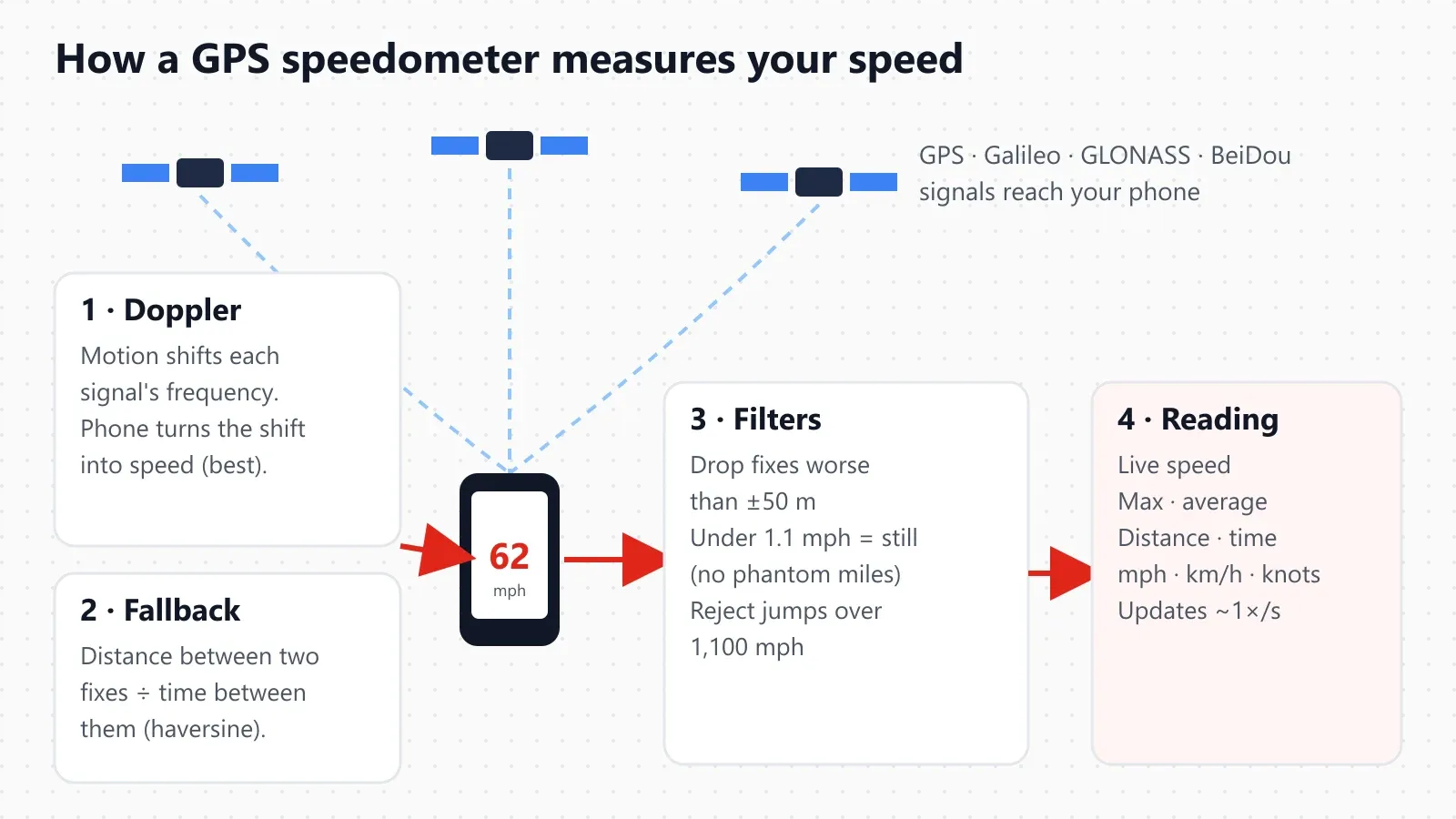
A modern phone listens to several satellite systems at once: the US GPS constellation run by the US Space Force, Europe’s Galileo, Russia’s GLONASS and China’s BeiDou. More satellites in view means a faster, steadier fix. Speed comes from one of two methods:
- Doppler speed (preferred). As you move towards or away from a satellite, the frequency of its signal shifts very slightly, just as an ambulance siren sounds higher as it approaches. The receiver measures that shift on every satellite in view and solves for your velocity. This gives an instant speed that doesn’t depend on how far apart two position fixes are, so it is far steadier than position-based methods. Android and iPhone both pass it to the browser as
coords.speed. - Position change (fallback). Some laptops, tablets and older browsers report a position but no speed. In that case the page takes the great-circle distance between the last two fixes (the haversine formula, using the mean Earth radius of 6,371 km) and divides it by the time between them.
speed = distance between fixes ÷ time between fixes
For example, two fixes 26.8 m apart and 1 second apart mean 26.8 m/s, which is 60 mph or 96.5 km/h.
The filters that keep the reading honest
Raw GPS data is noisy, so the speedometer applies three rules before showing a number:
| Rule | Value | Why |
|---|---|---|
| Ignore poor fixes | Accuracy worse than ±50 m (164 ft) | A fix that uncertain can’t give a usable speed or distance |
| Treat slow drift as standing still | Under 0.5 m/s (1.1 mph, 1.8 km/h) | GPS position “wanders” a few feet while you’re parked; without this, the odometer would add phantom miles |
| Reject impossible jumps | Over 500 m/s (about 1,118 mph) | Faster than any airliner, so it must be a glitch |
These thresholds are in the open-source maths behind the tool and are covered by unit tests. The methodology page explains how we test them.
How accurate is a GPS speedometer?
On an open road at a steady speed, a modern phone’s GPS speed is usually within about 1 mph (1–2 km/h) of your true speed. It gets worse among tall buildings, in tunnels and during hard acceleration.
Position and speed accuracy are different things. According to GPS.gov, GPS-enabled smartphones are typically accurate to within a 4.9 m (16 ft) radius under open sky, and worse near buildings, bridges and trees. Speed is better than that suggests, because Doppler speed doesn’t depend on the position error. The US government’s own commitment for the GPS signal is a range-rate (speed) error of 0.006 m/s or less over any 3 seconds, though what your phone actually shows also depends on its antenna, chipset and surroundings.
| Situation | Typical GPS speed accuracy | What you’ll notice |
|---|---|---|
| Interstate or open highway, clear sky, steady speed | ±1 mph (±1–2 km/h) | Number matches cruise control closely |
| Suburban streets with trees | ±1–3 mph | Small flickers under heavy tree cover |
| Downtown “urban canyons” (Manhattan, Chicago Loop) | ±2–5 mph, occasional jumps | Satellite signals bounce off buildings |
| Hard acceleration or braking | Lags 1–2 seconds | The number catches up after you settle |
| Tunnels, parking garages, deep indoors | No reading | Resumes within seconds of open sky |
| Airliner window seat at cruise | Good once fixed | First fix can take a minute or two |
The accuracy line under the gauge shows the phone’s own estimate (for example “±6 m (excellent)”). If it says “weak, move outdoors”, don’t trust the number until it improves.
GPS speed vs your car’s speedometer
Your car’s speedometer probably reads a little high. GPS is usually closer to your true speed on a straight road at a steady speed.
Car makers set speedometers to err on the high side. The international rule is UN Regulation No. 39, used for vehicle approval in Europe, the UK, Japan, Australia and many other countries. It says the indicated speed must never be lower than the true speed, and at the test speeds it allows:
0 ≤ (V1 − V2) ≤ 0.1 × V2 + 4 km/h
Here V1 is the speed shown and V2 is the true speed. US-market cars aren’t approved under R39, but most are built for global markets and follow the same “never read low” practice. Tire size changes the picture as well: a speedometer counts wheel turns, so worn tires (a smaller circumference) or larger aftermarket wheels shift the reading.
The table below shows the widest gap R39 allows, worked out from the formula above. Real cars are usually much closer, often 1–3 mph high.
| True speed | Highest reading R39 allows | Gap |
|---|---|---|
| 25 mph (40.2 km/h) | 30.0 mph (48.3 km/h) | +5.0 mph |
| 45 mph (72.4 km/h) | 52.0 mph (83.7 km/h) | +7.0 mph |
| 65 mph (104.6 km/h) | 74.0 mph (119.1 km/h) | +9.0 mph |
| 75 mph (120.7 km/h) | 85.0 mph (136.8 km/h) | +10.0 mph |
How to check your own car’s speedometer in 2 minutes
- Mount the phone, open this page and tap Start before you drive, then wait for “good” accuracy.
- On a straight, level highway with light traffic, set cruise control to an indicated 60 mph.
- Hold it for 15–20 seconds and have a passenger read the GPS speed.
- Work out the difference: if the car shows 60 and GPS shows 58, your speedometer reads 2 mph (3.4%) high.
- Repeat at 30 and 75 mph. The percentage is usually about the same at each speed.
If the gap is large, or your speedometer reads lower than GPS, check tire size and pressure first, then have the speed sensor checked. A low-reading speedometer can earn you a ticket. For the legal tolerances, tire-size effects and “why does my speedometer read 5 mph fast”, see GPS vs car speedometer; to work out and correct the error after new tires or a gear change, use the speedometer calibration calculator.
Speed units: mph, km/h, knots and m/s
1 mph = 1.609344 km/h exactly. 1 knot = 1.852 km/h ≈ 1.151 mph. 1 m/s = 3.6 km/h ≈ 2.237 mph.
| From | mph | km/h | knots | m/s |
|---|---|---|---|---|
| 1 mph | 1 | 1.6093 | 0.8690 | 0.4470 |
| 1 km/h | 0.6214 | 1 | 0.5400 | 0.2778 |
| 1 knot | 1.1508 | 1.852 | 1 | 0.5144 |
| 1 m/s | 2.2369 | 3.6 | 1.9438 | 1 |
Quick reference for common US speed limits:
| Speed limit | km/h | knots | m/s |
|---|---|---|---|
| 25 mph (school zones, residential) | 40.2 | 21.7 | 11.2 |
| 35 mph | 56.3 | 30.4 | 15.6 |
| 45 mph | 72.4 | 39.1 | 20.1 |
| 55 mph | 88.5 | 47.8 | 24.6 |
| 65 mph | 104.6 | 56.5 | 29.1 |
| 70 mph | 112.7 | 60.8 | 31.3 |
| 75 mph | 120.7 | 65.2 | 33.5 |
| 80 mph | 128.7 | 69.5 | 35.8 |
The speedometer picks mph automatically in the US and UK and km/h elsewhere. Tap a unit button to change it; your choice is remembered on this device. Boaters and pilots should use knots, and physics students m/s.
Features of this speedometer
| Feature | What it does | When it helps |
|---|---|---|
| Live speed | Updates about once a second | Everything |
| Max speed | Highest speed this trip, with reset | Track days, train rides, bike descents |
| Average speed | Distance ÷ time spent moving (stops don’t count) | Commutes, cycling, road trips |
| Odometer and trip timer | Distance in miles, km or nautical miles | Rental cars, mileage logs, runs |
| Speed alert | Beeps above a limit you set | School zones, new drivers, towing |
| HUD mode | Mirrored display to reflect in the windshield | Night driving |
| Full screen and digital view | Big, high-contrast number | Dashboard mounts |
| Heading, altitude, coordinates | Compass direction, elevation, lat/long | Hiking, flying, boating |
| Speed graph | Your speed over the whole trip | Seeing acceleration and stops |
| GPX export | Download the trip track | Strava, Google Earth, mileage records |
| Works offline | Keeps running once loaded, even without data | Rural roads, flights, ferries |
Install the speedometer app (free, no download)
You can install this speedometer as an app straight from your browser: open the page, choose “Add to Home Screen” (iPhone Safari) or “Install app” (Android Chrome), and it gets its own icon and opens full screen like a native app. It is free, needs no app store, no account and no sign-up.
The site is a Progressive Web App (PWA): a web page with an app manifest and a service worker, so the browser can install it and keep a copy for offline use. It is the same speedometer and speed tracker as this page, with the same live GPS speed, max and average speed, trip distance, HUD mode and GPX export.
On Android (Chrome):
- Open speedometera.com in Chrome.
- Tap the ⋮ menu at the top right.
- Tap Install app (on some versions, Add to Home screen, then Install).
- Open it from the new icon on your home screen or app drawer.
On iPhone or iPad (Safari):
- Open speedometera.com in Safari.
- Tap the Share button (the square with an arrow).
- Scroll down and tap Add to Home Screen, then Add.
- Open it from the new icon; it runs full screen without the Safari address bar.
What you get from the installed app:
- Price: free, with no paid upgrades.
- Download: nothing from an app store; the browser caches the pages.
- Account: none.
- Offline: works after the first visit.
- Location data: stays on your phone; speed and position are never sent to our server.
- Updates: automatic on your next visit.
Once installed, the speedometer opens even with no signal, because the service worker stores the app shell on your phone after the first visit. GPS needs no mobile data, so it keeps tracking speed on rural roads, ferries and flights. Two limits apply to every web app: the phone must stay on this screen to keep receiving GPS (browsers pause location in the background), and you grant location permission the first time you tap Start, just as in the browser.
Tips for the most accurate reading
- Start while stopped and wait for the accuracy line to show “good” or “excellent” before relying on the number.
- Give the phone a view of the sky. A dashboard or windshield mount works far better than a cup holder, door pocket or jeans pocket. Metallic windshield tints and heated windshields can weaken the signal.
- Keep the page open and the screen on. Browsers pause GPS in background tabs. The tool asks your phone to keep the screen awake while it runs.
- Turn on precise location. On iPhone: Settings → Privacy & Security → Location Services → your browser → Precise Location on. On Android: Settings → Location → Google Location Accuracy on.
- Use a charger on long trips. High-accuracy GPS with a screen that stays on uses noticeably more battery than normal browsing.
- On trains and planes, sit by a window. Expect gaps in tunnels and a slower first fix at cruising altitude.
No speed reading yet? Troubleshooting
If the speedometer still shows “–”, it either has no permission to read your location or is still waiting for its first GPS fix. Check permission first, then that location is switched on, then that the phone can see the sky. Most problems clear up within a minute.
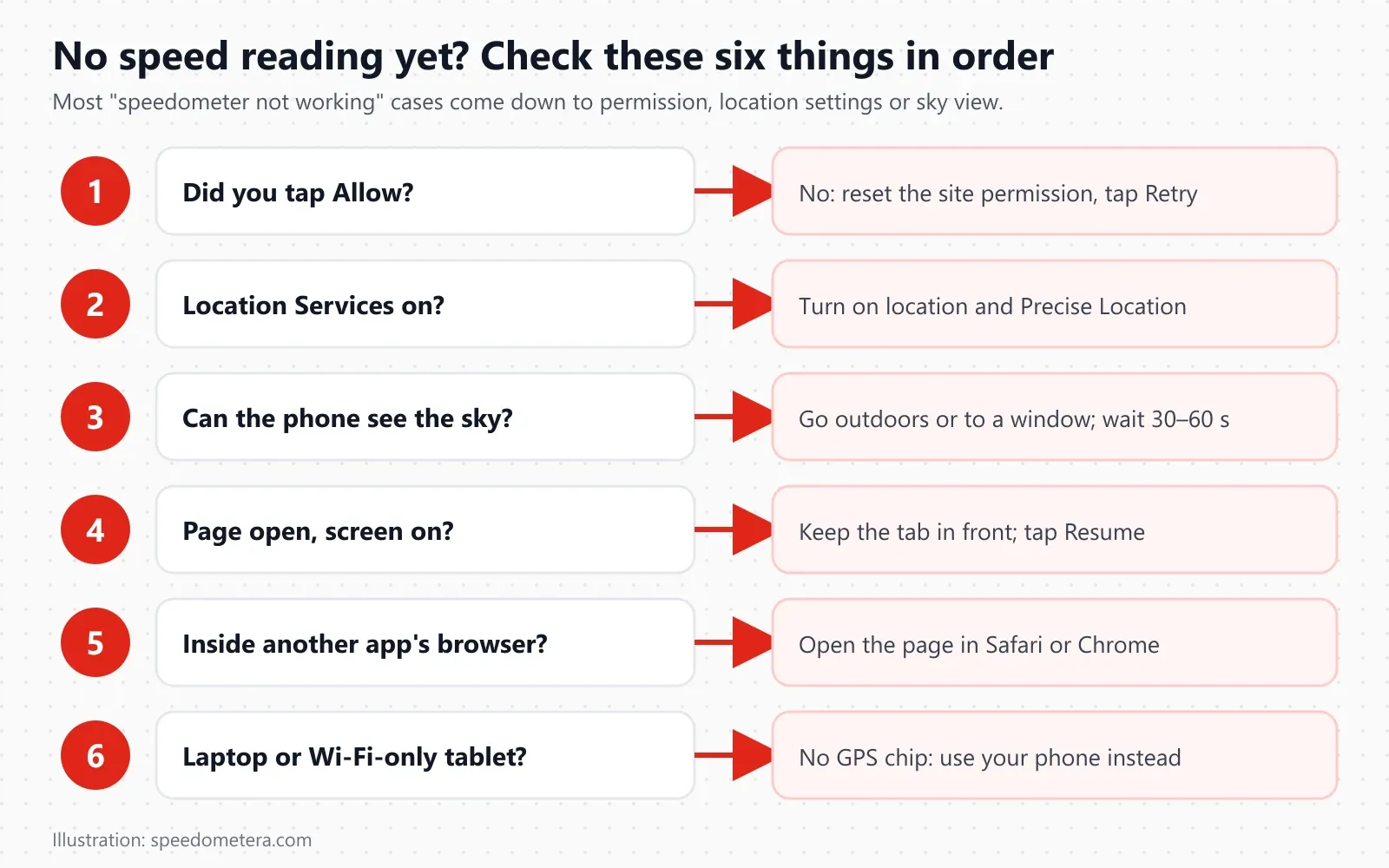
The message under the MAX pill tells you which problem you have. Find yours in the table:
| What you see | Likely cause | Fix |
|---|---|---|
| “Location permission was denied…” and the button says Retry | You tapped Block or Don’t Allow, or the browser itself has no location access | Reset the permission for this site (steps below), then tap Retry |
| “Waiting for a GPS fix…” for more than a minute | Indoors, underground, or the phone has no recent fix | Go outside or hold the phone to a window. A first fix in a new place can take a minute or more |
| “No GPS signal yet. Move outdoors…” | The phone reported position unavailable | Location Services may be off, or the sky view is blocked; check both |
| “Still waiting for GPS…” | No fix arrived within 20 seconds | Leave the page open: it keeps listening and updates as soon as a fix arrives |
| “GPS needs a secure (https) page.” | The page was opened over plain http, through a proxy or a saved copy | Open https://speedometera.com directly |
| “This browser cannot read GPS…” | A very old or stripped-down browser with no Geolocation support | Use Safari on iPhone or Chrome on Android |
| Reading freezes, or “Back on the page. Waiting for a fresh reading…” | You switched apps, locked the screen, or another tab was in front | Keep this tab in front with the screen on; the reading returns within seconds |
| GPS accuracy shows “(weak, move outdoors)” | Accuracy is worse than ±50 m, so the page ignores those fixes | Move away from tall buildings and out of garages and tunnels |
| Speed jumps around downtown | Satellite signals bouncing off buildings (“urban canyon” multipath) | Expect it among high-rises; it settles on open road |
| Shows 0 while you walk very slowly | Under 0.5 m/s (1.1 mph) counts as standing still | Expected: it stops GPS drift from adding phantom miles |
| Nothing at all on a desktop or laptop | No GPS receiver in the computer | See why it doesn’t work on a computer or tablet |
How to reset a blocked location permission
Browsers remember a “Block” choice, so the page can’t ask again until you change it yourself. The exact path depends on your phone and browser:
- iPhone or iPad, Safari, this site only: tap the page menu button in the address bar (shown as aA on most iOS versions) → Website Settings → Location → Allow or Ask (Apple Support).
- iPhone, Safari, all sites: Settings → Apps → Safari → Location → Ask or Allow (older iOS: Settings → Safari → Location). Also check Settings → Privacy & Security → Location Services → Safari Websites → While Using the App, with Precise Location on; if that says Never, no website can read your location (Apple Support).
- iPhone, Chrome or another browser: Settings → Privacy & Security → Location Services → choose the browser (for example Chrome) → While Using the App, with Precise Location on (Apple Support).
- Android, Chrome: tap the site information icon left of the address bar → Permissions → Location → Allow. For a site you blocked earlier: ⋮ menu → Settings → Site settings → Location, then pick the site under “Not allowed” (Google Chrome Help).
- Chrome on a computer: click the site information icon in the address bar → Site settings (or the Location permission toggle) → Location → Allow, then reload the page (Google Chrome Help, Computer tab).
- Microsoft Edge: click the lock or info icon in the address bar → Permissions for this site → Location → Allow. Edge’s global switch is under Settings → Privacy, search, and services → Site permissions → All permissions → Location (Microsoft Support).
- Firefox: click the site information or permissions icon at the left of the address bar and clear the blocked location permission, or go to Settings → Privacy & Security → Permissions → Location → Settings…, select the site and remove it, then reload (Mozilla Support). Labels vary slightly between Firefox versions.
After you change it, reload the page and tap Retry.
Location Services are turned off
Even with browser permission, the phone has to have location switched on. On iPhone: Settings → Privacy & Security → Location Services on (Apple Support). On Android, swipe down from the top and tap the Location tile, or open Settings → Location. Leave Precise Location (iPhone) or Google Location Accuracy (Android) on: an approximate location is only good to a few miles and can’t give a speed.
Indoors, tunnels and urban canyons
GPS signals are weak radio signals from satellites about 12,550 miles (20,200 km) up (GPS.gov space segment), and they don’t pass through roofs, concrete or soil well. Inside a building, in a parking garage, a subway or a long highway tunnel, the phone usually loses the fix and the reading stops. Among tall buildings, signals reflect off glass and steel before they reach you, which makes the position and speed jump. GPS.gov lists buildings, bridges and trees as the main causes of poor smartphone accuracy. A window seat on a train, bus or plane is usually enough; a phone in a bag or under the dashboard is often not.
Waiting for the first fix: cold and warm starts
A receiver that was used recently, nearby, starts quickly (a “warm” or “hot” start), because it already knows roughly where the satellites are. After a long flight, a few days off, or a phone restart in a new place, it starts “cold” and has to find the satellites from scratch, which takes longer. Phones speed this up with assisted GPS (A-GPS), which downloads satellite orbit data over your mobile or Wi-Fi connection. So the first fix comes faster with a data connection, even though the speedometer itself doesn’t need one once the page has loaded. Times vary by phone and conditions, so keep the phone still with a clear view of the sky and give it up to a minute or so; it usually locks on.
Battery saver and Low Power Mode
Power-saving modes can make the phone report location less often or less precisely, and some Android battery modes switch off GPS when the screen is off. If the speed only updates every few seconds or lags badly, turn the battery saver off for the trip and plug the phone into a charger. The speedometer asks the browser to keep the screen awake while it runs; browsers stop sending location to pages that aren’t on screen.
In-app browsers (Facebook, Instagram, Gmail, TikTok)
If you opened this page from a link inside another app, it may be running in that app’s built-in browser. Those browsers often handle location permission poorly or not at all. Use the app’s menu to choose Open in Safari or Open in Chrome, or type the address straight into your browser.
HTTPS only
Browsers only share location with secure pages. The W3C Geolocation specification treats a request from a non-secure page as permission denied (W3C Geolocation API). This site is always served over https; if your address bar shows anything else, you are probably on a copy or proxy of the page.
What the numbers mean
The big number is your current speed over ground. Below it, MAX is your top speed, Avg is your average while moving, and Distance and Time measure the trip. Accuracy tells you how far to trust it all.
Here is every reading on the speedometer card, exactly as it is labeled on screen:
| Label on screen | What it shows | How it is worked out | Good to know |
|---|---|---|---|
| Big number (with unit below) | Current speed | The phone’s Doppler speed, or distance ÷ time between fixes, lightly smoothed | Shows “–” until the first fix; under 1.1 mph shows 0 |
| MAX | Top speed since you started or reset | Highest accepted speed of the trip | Tap the ✕ in the MAX pill to reset only the max |
| Avg | Average moving speed | Trip distance ÷ time spent moving | Red lights and stops don’t drag it down |
| Distance | Trip odometer | Sum of the distances between good fixes while moving | miles with mph, km with km/h or m/s, nautical miles with knots |
| Time | Trip clock | Time since you first tapped Start (min:sec, then h:mm:ss) | Keeps counting while paused; tap Reset to zero it |
| Pace (running and walking pages) | Minutes per mile or per km | Inverse of current speed | Appears only on the running and walking tools |
| Heading | Direction of travel, e.g. “NE 47°” | Course reported by the phone, 0° = north | Shows “–” when you’re stopped, because GPS can’t tell direction without movement |
| Altitude | Height above sea level | Reported by the phone’s GPS | Feet with mph, meters otherwise; GPS height is less precise than position |
| Speed this trip | Line chart of your speed | The whole trip, scaled to fit | Appears after the second reading |
| GPS accuracy | Estimated error radius, e.g. “±6 m (excellent)” | The phone’s own accuracy estimate | ±10 m or better: excellent; up to ±25 m: good; up to ±50 m: fair; worse: weak, ignored |
The status line under MAX tells you what the tool is doing: “Live. Keep this page open and the screen on.” means readings are arriving; “Paused. Tap Resume for a fresh reading.” means you tapped Stop. Reset clears the max, average, distance, time, chart and saved track and starts a fresh trip.
Why Avg is usually higher than you expect
Average here means moving average: distance divided by time spent in motion, not by the clock. A 10-mile commute that takes 30 minutes, 6 of them at red lights, shows an Avg of 25 mph (10 ÷ 24 minutes), not 20 mph. That is the same way most bike computers and car trip computers report it. For the overall figure including stops, divide Distance by Time yourself.
Why doesn’t the speedometer work on my computer or tablet?
Most laptops, desktops and Wi-Fi-only tablets have no GPS receiver. They estimate location from nearby Wi-Fi networks or your IP address, which gives a rough position but no usable speed. Use a phone, or a tablet with cellular service.
When a computer is asked for its location, Windows or macOS looks up nearby Wi-Fi networks and your IP address in a database. Microsoft says Windows estimates location from “IP address, nearby Wi-Fi access points, and GPS data if your device has it” (Microsoft Support). That is fine for finding the nearest coffee shop, but:
- There is no speed value. The Geolocation API’s
speedfield is allowed to benull“if not available” (W3C), and Wi-Fi or IP location never provides it. - The position barely changes. A laptop on a moving bus or train sees the same Wi-Fi hotspot, or none, for minutes at a time, so the position-change fallback reads 0 or jumps wildly.
- Accuracy is often worse than ±50 m, so this speedometer discards those fixes rather than show a made-up speed.
| Device | GPS receiver? | Will the speedometer work? |
|---|---|---|
| iPhone, any Android phone | Yes | Yes, best choice |
| iPad Wi-Fi + Cellular | Yes (GPS/GNSS) | Yes |
| iPad Wi-Fi only | No (Apple iPad specs) | Position only, no reliable speed |
| Android tablet with LTE/5G | Usually | Usually; check the spec sheet for “GPS” |
| Windows laptop or MacBook | Almost never | No usable speed |
| Desktop computer | No | No |
| Chromebook | Rarely | No usable speed |
Workarounds
- Use your phone. It’s the most accurate GPS receiver you own. Mount it on the dash or windshield.
- Use a cellular iPad in a car or on a plane; it has the same kind of GPS chip as an iPhone.
- Wi-Fi tablet plus phone hotspot doesn’t help: sharing a phone’s data connection shares internet, not GPS.
- Plug in a USB or Bluetooth GPS receiver if you must use a laptop. Some work with Windows location services, so the browser can use them; check the receiver’s instructions.
- Plan ahead on a computer. You can open the page on a laptop to test the buttons, units and HUD mode, then use the same page on your phone in the car.
Safety and the law
Never type, tap or look down at your phone while driving or riding. Many US states ban holding a phone while driving at all, and texting at the wheel is illegal almost everywhere; check your state’s law. Set the speedometer up before you set off, mount the phone securely where it doesn’t block your view, or hand it to a passenger. GPS speed is an estimate: always follow posted limits and your vehicle’s own instruments, and don’t count on this page to get you out of a ticket.
Your privacy
Your location never leaves your device. The speedometer runs entirely in your browser. Location readings are used on your phone to calculate speed and distance, held in memory only while the page is open, and discarded when you reset or leave. We don’t record, store or send your location to any server, and the GPX file is created on your device only when you ask for it. Read the full privacy policy.